Leaflet for map projects
When it comes to working with maps, simplicity, comprehensiveness, and adaptability are the key components. That is when Leaflet library comes in handy. Leaflet is known for being one of the leading JavaScript map libraries. It is open-source, mobile-friendly, and highly adaptable.
At BHSOFT, Leaflet is one of our favorite tools to build maps for our clients, besides OpenLayers and Mapbox. We offer 2D and 3D GIS solutions to a variety of companies. Our team is capable of transforming and mashing up multiple data sources to create lively and brilliant maps that work well on both desktop and mobile platforms. In this article, we will together find out the benefit of using Leaflet in map projects and how it helped us to build a drawing tool for our client map.
What is Leaflet?
Leaflet is an open-source JavaScript library for developing interactive maps. It is also known for being lightweight and very mobile-friendly.
Key Highlights:
Weight: Extremely light, ensuring fast load times (crucial for Core Web Vitals).
Compatibility: Works seamlessly across all modern browsers and mobile platforms.
Open Source: No heavy licensing fees compared to proprietary alternatives.
What Leaflet can do
Leaflet can deal with interactive maps across various kinds of platforms from desktop to mobile. The library allows developers to easily pan, zoom and draw on the map. It also includes alternative base maps. Leaflet can:
- Display vector layers, GeoJSON layers, WMS layers.
- Display raster image as layers.
- Allow point clustering, geocoding, routing, mini-map, loading data from CSV via plugins
Leaflet is great for projects that require lots of maps thanks to its simplicity and high performance.
Advantages of Leaflet
Easy to start with
Leaflet design is very easy to use. Developers can easily start building a map just by copy & paste from the QuickStart tutorial.
Good documentation
Leaflet has really well-structured documentation with plenty of examples and tutorials. A well-documented API also allows developers to quickly find the functionality required.
Less amount of code
Being one of the most popular JavaScript libraries, Leaflet has a huge community to support. Developers are able to achieve the results with minimal amount of code.
Powerful with plugins
It is very flexible and extendable with plugins. The core features are pretty sufficient for building basic maps. However, they only support GeoJSON format. With additional plugins, Leaflet will also support other GIS formats such as CSV, WKT, TopoJSON, and GPX.
Learn more: Custom mapping services with real-time data
Advanced Features
To stay relevant in 2026, your Leaflet project should leverage these modern capabilities:
Integrating Vector Tiles
While Leaflet is traditionally raster-based, you can now use plugins like Mapbox-GL-Leaflet or Leaflet.VectorGrid to render vector tiles, allowing for smooth zooming and dynamic styling without losing the simplicity of the Leaflet API.
Leaflet & React/Vue/Next.js
Integration with modern frameworks has never been easier. Using React-Leaflet, developers can manage map layers as stateful components, making it ideal for real-time data visualization projects.
Real-time Data Visualization
With the integration of WebSockets and GeoJSON, Leaflet is now widely used for tracking delivery vehicles, monitoring IoT sensors, or displaying live weather updates.
Leaflet vs. Competitors: Which One to Pick?
| Feature | Leaflet | Google Maps API | Mapbox GL JS |
| Cost | Free (Open Source) | Pay-as-you-go | Tiered Pricing |
| Learning Curve | Low (Very Easy) | Medium | High |
| Weight | ~42 KB | Heavy | Medium |
| Vector Tiles | Via Plugins | Native | Native (Excellent) |
| Customization | High | Limited by API | Exceptional |
How Leaflet helped BHSOFT in our project
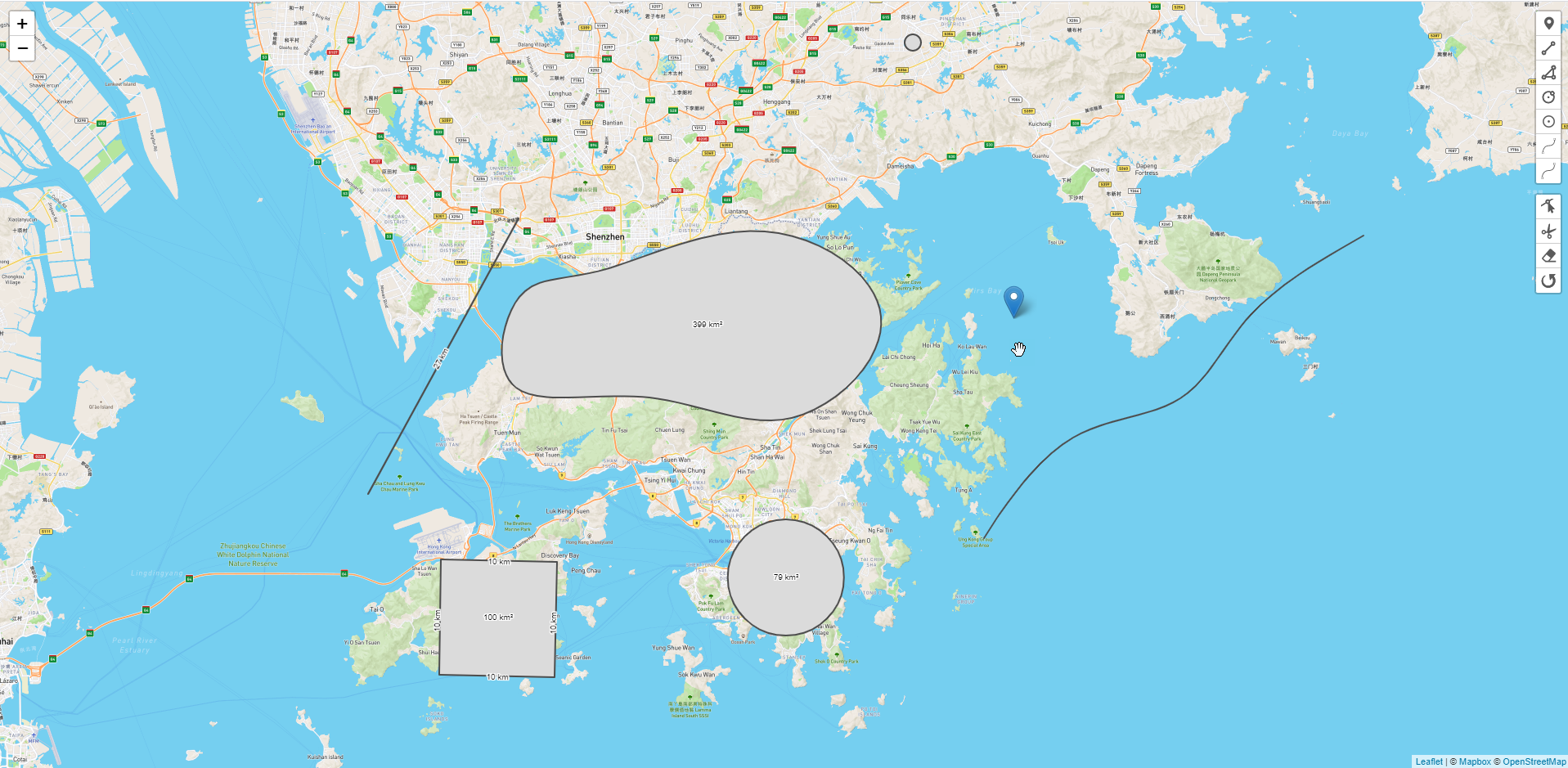
In this article, BHSOFT will present to you one of the projects in which we used Leaflet to build a drawing tool within the map provided by our client. We chose Leaflet because most of the data we had to deal with was GeoJSON data, and we didn’t have to deal with projections. Therefore, Leaflet was an ideal choice and saved us a lot of time.
Basically, we built a drawing tool inside the map that allows users to:
- Create polygons with measurements & display area information.
- Edit, rotate & drag the polygon around a map.
- Control and edit the color, weight, and line type (dashed, solid, etc).
- Create guidelines to 90 degrees, nearby objects to suggest finishing the shape, and snap to lines/corners.
- Draw objects with curved lines.
- Draw shapes on the map and edit the created shapes
At BHSOFT, we have very strong teams of Javascript developers so we also use Leaflet for map projects very often. However, we are also highly experienced with other libraries including Mapbox and OpenLayers, which allow us to create more sophisticated GIS applications. For projects that require lots of plugins, projections with different Geo data sources, we will choose OpenLayers as our prominent tool.
Working with us, we will help you build interactive and useful maps. Contact us via [email protected] or fill in our contactus form for further details.