Turning CRM Data into Personalized Marketing
10 minutes read
Aug 26, 2026
Collecting customer data is only the beginning.
For many enterprises, CRM systems contain a significant amount of information about customers and prospects: company details, job roles, lifecycle stages, previous interactions, marketing activities, sales opportunities, and more. But having this information does not automatically create better marketing.
The real value comes from being able to turn CRM data into relevant experiences and timely actions. Instead of sending the same message to every contactus, businesses can use the information already stored in their CRM to understand different audiences, personalize content, automate communication, and guide prospects through the customer journey.
This is where HubSpot can become more than a CRM or email marketing platform. It can become the layer that connects customer data, segmentation, content, and automation.
At BHSoft, this is an important part of the HubSpot projects we work on: helping businesses move from simply collecting customer data to actually using that data to create more relevant marketing experiences.
From Customer Data to Marketing Action
A typical enterprise environment may contain information such as:
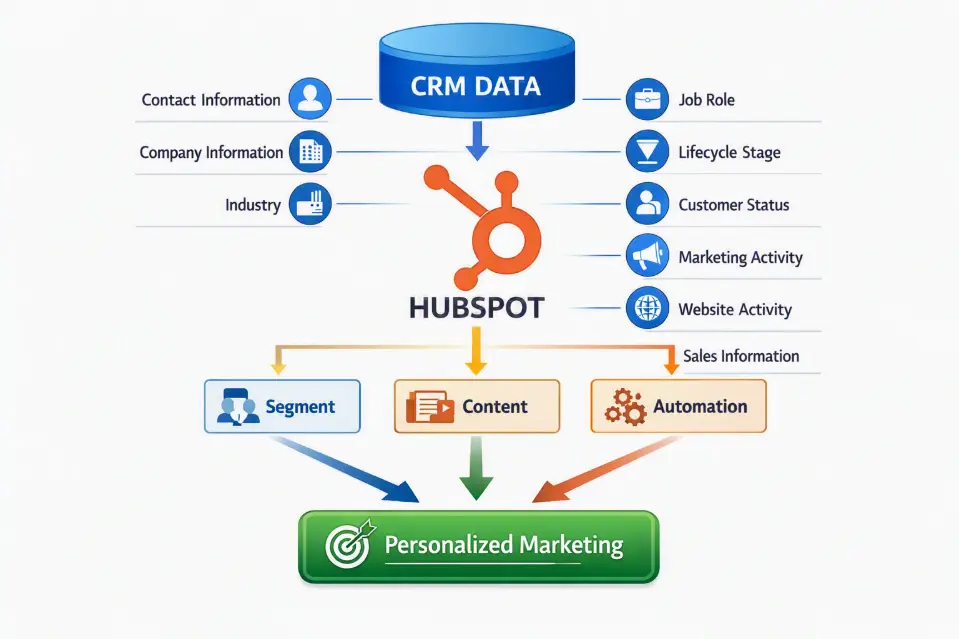
The objective is not to personalize everything for everyone. Instead, the goal is to use available data to answer three fundamental questions:
- Who should we communicate with?
- What should we communicate?
- When should we communicate?
When those three decisions are connected to reliable CRM data, personalization becomes much more scalable.
1. Start With a Reliable CRM Data Foundation
Personalized marketing is only as good as the data behind it. If a Contact's industry, lifecycle stage, company information, or customer status is missing or incorrect, the marketing experience built around that information may also be incorrect.
For example, imagine a campaign targeting enterprise customers. The marketing team creates a segment based on: Customer Type = Enterprise
But the CRM contains inconsistent values:
- Enterprise
- enterprise
- Enterprise Client
- ENT
- Large Business
A segment based on a single value may fail to capture the intended audience. This is why personalized marketing should begin with the same principles discussed in our previous article on enterprise HubSpot data challenges: clean data, clear definitions, reliable identifiers, and consistent data ownership.
👉 For a deeper look at these challenges, read our article: Data Challenges in Enterprise HubSpot Projects
When CRM data is structured properly, it becomes much easier to build reliable marketing logic on top of it.
2. Segment Customers Based on More Than Demographics
Basic segmentation often starts with information such as:
- Industry
- Location
- Company size
- Job title
- Customer type
These attributes are useful, but they are only one part of the picture.
A more effective marketing strategy can combine customer characteristics with behavior and relationship context.
For example: Industry + Company Size + Lifecycle Stage + Website Activity + Form Submission + Previous Campaign Engagement
This can produce a much more meaningful audience. Instead of "Send this email to everyone.", the marketing team can define: "Send this content to technology companies that are in the consideration stage and have recently interacted with our integration-related content."
HubSpot supports segmentation using CRM properties and customer activity, allowing marketing teams to create more targeted audiences.
The more accurately the audience is defined, the more relevant the resulting marketing communication can become.
3. Personalization Is More Than Adding a First Name
One of the simplest forms of personalization is: Hello, {{First Name}}
It is useful, but it is only the beginning. Modern CRM-based personalization can use information such as:
- Contact name
- Company name
- Industry
- Job role
- Location
- Lifecycle stage
- Customer type
- Previous interactions
- Relevant business interests
HubSpot personalization tokens can dynamically insert CRM property values into marketing content, including emails and other supported content experiences. For example:
| Generic message | Personalized message |
|---|---|
Discover how our solutions can help your business improve operational efficiency. | Discover how our solutions can help technology companies streamline operational workflows. |
The difference is not simply using the recipient's name. It is making the message more relevant to the recipient's context.
4. Use CRM Data to Personalize Email Content
Email remains one of the most common applications of CRM-driven personalization. Consider a company with three major customer segments:
- Enterprise
- SMB
- Technology Partners
Instead of creating three completely separate campaigns, the marketing team can build reusable email structures and personalize specific elements according to CRM data. For example:
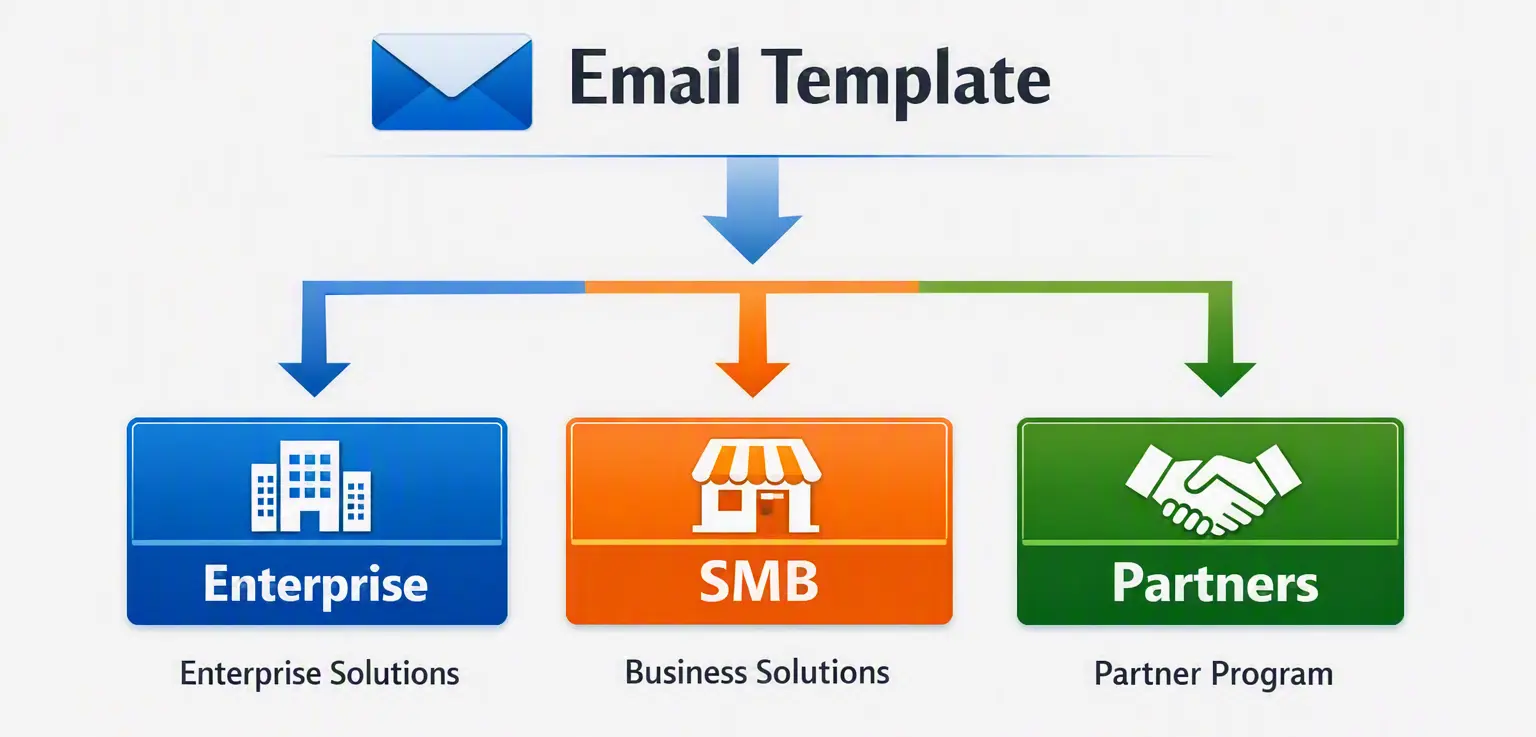
The structure remains consistent while the message, CTA, or supporting content changes based on the Contact's attributes. This creates a balance between personalization and operational efficiency. The marketing team does not need to manually create every email variation from scratch.
5. Combine Segmentation With Lifecycle Stage
Customer needs change depending on where someone is in their relationship with the business. A new Lead should not necessarily receive the same message as an existing Customer.
For example: Lead ⟶ Marketing Education ⟶ MQL ⟶ Sales Engagement ⟶ Opportunity ⟶ Customer ⟶ Retention / Expansion
Each stage can have different marketing objectives.
| Stage | Focus on |
|---|---|
| New Leads | Education Awareness Useful resources Problem identification Qualified Prospects |
| Qualified Prospects | Relevant solutions Case studies Product information Business value Opportunities |
| Opportunities | Decision support Technical information Implementation considerations Proof of value |
| Existing Customers | Product adoption New capabilities Cross-selling Customer education Retention |
When lifecycle data is synchronized correctly, HubSpot workflows can use those values as triggers for automated marketing actions.
6. Turn CRM Events Into Automated Marketing
Personalization becomes significantly more powerful when it is connected to automation. Instead of manually deciding when to contactus every Lead, businesses can define rules based on customer data and behavior.
For example: Contact submits a form ⟶ CRM record created/updated ⟶ Check Lifecycle Stage ⟶ Identify Customer Segment ⟶ Enroll in relevant Workflow ⟶ Send personalized content ⟶ Monitor engagement
A workflow could:
- Send a confirmation email.
- Update a Contact property.
- Assign a Lifecycle Stage.
- Notify a Sales representative.
- Add the Contact to a relevant segment.
- Send follow-up content.
- Synchronize information with an internal CRM.
HubSpot workflows can use triggers such as form submissions, property changes, page views, campaign engagement, and other record events to execute actions automatically.
This turns personalization from a manual marketing activity into a repeatable process.
7. Personalize the Customer Journey, Not Just Individual Emails
A common mistake is to think of personalization as an email feature. In reality, the same CRM data can influence multiple customer touchpoints.
For example:
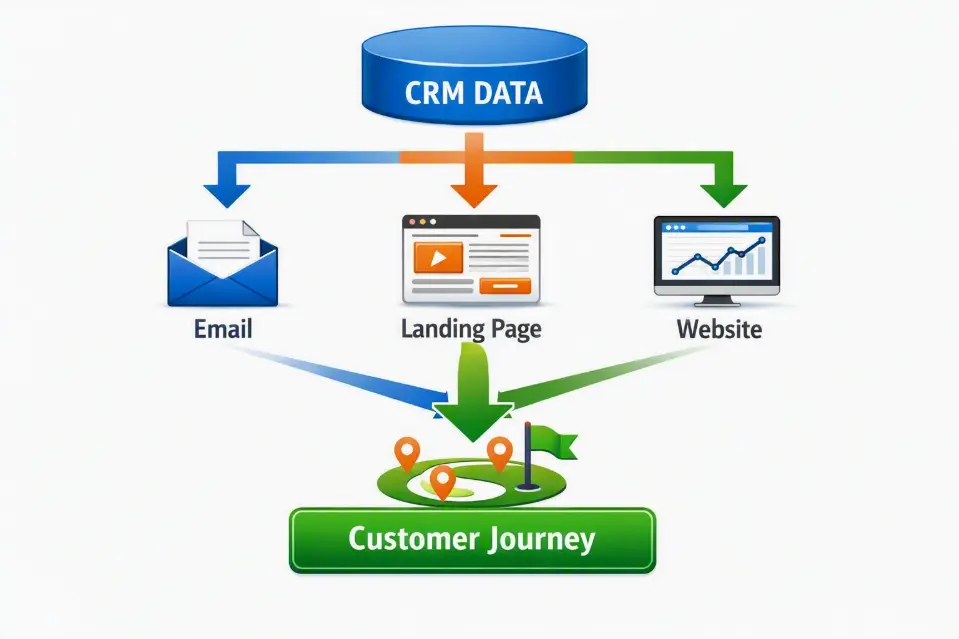
Depending on the HubSpot tools and subscription in use, CRM data can support personalization across emails, landing pages, website content, forms, and other marketing touchpoints. For example, someone who has previously interacted with content about a specific business problem could receive:
- A relevant follow-up email.
- A landing page focused on the same topic.
- A CTA leading to a related resource.
- A sales notification when the Contact reaches a defined engagement threshold.
The experience becomes more coherent because different marketing activities are informed by the same customer data.
8. Connect Website Behavior With CRM Data
A customer's website activity can provide valuable context for marketing. For example, a Contact may: Visit Integration Page ⟶ Read Case Study ⟶ Download Technical Guide ⟶ Submit Contact Form
Each interaction can provide additional signals about the Contact's interests. When those interactions are connected to the CRM, marketing teams can use them to create more relevant segments and workflows.
For example: Contacts who have viewed integration-related content and submitted a related form can enter a dedicated nurture workflow.
This is significantly more useful than sending the same generic campaign to the entire database.
9. Personalization Requires a Connected CRM Ecosystem
For enterprises, personalization becomes more challenging when customer information is spread across multiple systems.
If important customer information remains in the internal CRM while HubSpot only contains a partial view of the Contact, personalization becomes limited. This is why data synchronization is so important.
Our earlier articles in this series explored how enterprise CRM systems can be connected with HubSpot and how an integration layer such as n8n can help manage data movement and transformation.
👉 Read more: Enterprise HubSpot Integration
👉 Read more: Why We Use n8n as the Integration Layer
The objective is not necessarily to move every piece of data into HubSpot. Instead, the goal is to make sure HubSpot has the right information needed to support marketing and customer engagement.
10. Build Reusable Marketing Components
Personalization should not create additional operational complexity for the marketing team. If every personalized campaign requires developers to build a new email or landing page, the organization may quickly become dependent on technical resources.
A better approach is to create reusable components. For example: Reusable Email Template
- Header
- Introduction
- Personalized Content
- Dynamic CTA
- Footer
The marketing team can then change the content or personalization logic without rebuilding the entire experience.
This approach is particularly useful for enterprises running multiple campaigns across different markets, industries, or customer segments.
11. Personalization Should Follow Clear Business Rules
More personalization does not automatically mean better personalization. If a company creates hundreds of overlapping segments and complicated workflows, the marketing environment can become difficult to understand and maintain.
For this reason, personalization should be based on clear business rules.
For example: IF Industry = Technology AND Lifecycle Stage = Lead AND Interest = Integration THEN Send Integration Content
The logic should be:
- Understandable
- Documented
- Testable
- Maintainable
- Aligned with business objectives
The goal is to create meaningful personalization rather than complexity for its own sake.
Common Data Mistakes We See
1. Personalizing Only the Name
Adding a Contact's first name does not automatically make a campaign personalized. The content should reflect relevant customer context whenever reliable data is available.
2. Using Poor-Quality CRM Data
If customer information is incorrect or inconsistent, personalization rules may target the wrong audience. Good personalization starts with good data.
3. Creating Too Many Segments
Not every small difference between customers requires a separate campaign. Segments should correspond to meaningful differences in customer needs or behavior.
4. Building Automation Without Clear Business Rules
A technically functional workflow can still produce poor marketing outcomes if its triggers and actions do not reflect the actual customer journey.
5. Making Marketing Dependent on Developers
If marketers need developers every time they want to update an email, landing page, or campaign, personalization becomes slower and more expensive. Reusable templates and modules can give marketing teams greater independence.
6. Treating Personalization as an Email-Only Strategy
CRM data can inform the broader customer journey, including website content, landing pages, forms, workflows, and sales follow-up.
7. Ignoring Data Ownership
When HubSpot and internal systems both update customer information, unclear ownership can result in outdated or conflicting data. Personalization is only reliable when the underlying data remains trustworthy.
How We Approach CRM-Driven Personalization at BHSoft
At BHSoft, we view personalized marketing as the final layer of a broader data and integration architecture. Our approach typically follows this structure:
1. Connect the Data
Integrate HubSpot with the relevant CRM, website, or business systems.
2. Define the Data Model
Determine which Contact, Company, Deal, and business properties are required for marketing.
3. Improve Data Quality
Normalize values, identify duplicates, establish identifiers, and define data ownership.
4. Build Meaningful Segments
Combine customer attributes, lifecycle information, and relevant behavior.
5. Create Reusable Content
Develop email templates, modules, landing pages, and other reusable marketing components.
6. Automate Customer Journeys
Use HubSpot Workflows to trigger appropriate actions based on customer data and behavior.
7. Measure and Improve
Monitor engagement and business outcomes, then refine segmentation, content, and automation rules. This creates a continuous cycle: Customer Data ⟶ Segmentation ⟶ Personalized Content ⟶ Automation ⟶ Customer Interaction ⟶ New Data ⟶ Improved Segmentation
The more effectively this cycle works, the more valuable the CRM becomes as a foundation for marketing.
From CRM Data to Customer Experience
A CRM should not simply be a database where customer information is stored. When connected to marketing automation, it can become the foundation for more relevant customer experiences.
The transformation looks like this: Data ⟶ Information ⟶ Customer Context ⟶ Segmentation ⟶ Personalization ⟶ Automation ⟶ Customer Experience
This is where the value of a connected HubSpot ecosystem becomes clear. Instead of treating CRM, website, marketing, and sales as separate activities, businesses can connect them around a shared understanding of the customer.
Conclusion
Personalized marketing does not start with writing a better email. It starts with having the right customer data and knowing how to use it. For enterprises, this means connecting CRM data with marketing tools, maintaining consistent data structures, defining meaningful segments, and building automation around the customer journey.
HubSpot provides capabilities for using CRM properties, segmentation, personalization tokens, and workflows to turn customer information into targeted marketing experiences.
But technology alone is not enough. The real challenge is designing the data model, integration architecture, business rules, and marketing processes that allow those capabilities to work together.
At BHSoft, our approach is to connect these layers-from enterprise CRM integration and data engineering to HubSpot marketing automation and personalized customer experiences.
Looking for an Enterprise HubSpot Partner?
Whether you need to connect HubSpot with an existing CRM, improve customer data quality, build marketing automation, or create personalized customer journeys, BHSoft can help.
Our team combines HubSpot expertise, enterprise integration experience, data engineering, and custom software development to build solutions around your existing business environment. Contact BHSOFT today to discuss your project!