Data Challenges in Enterprise HubSpot Projects
10 minutes read
Aug 26, 2026
Implementing HubSpot is often described as a CRM or marketing automation project.
For enterprise organizations, however, one of the biggest challenges is not configuring HubSpot itself. It is the data.
Large organizations rarely start with a clean, standardized dataset that is ready to be moved into a new platform.
- Customer information may already exist across internal CRM systems, ERP platforms, websites, spreadsheets, marketing tools, databases, and other business applications.
- Different systems may use different structures, naming conventions, identifiers, and business rules.
- Some records may be incomplete. Others may be duplicated. Some information may belong exclusively to one system, while other data needs to be synchronized across multiple platforms.
As a result, successfully implementing HubSpot requires much more than connecting APIs or importing a list of Contacts.
It requires a clear strategy for understanding, mapping, cleaning, synchronizing, and governing data.
At BHSoft, our experience with enterprise HubSpot projects has shown that data challenges often determine whether an integration remains manageable in the long term.
Data Is Often the Hardest Part of HubSpot Integration
When organizations begin a HubSpot project, the initial expectation is often straightforward: "We already have customer data. We just need to move it into HubSpot."
In practice, the process usually looks more like this: Existing Business Systems → Multiple Data Sources → Different Data Structures → Data Quality Problems → Data Mapping → Data Transformation → HubSpot
The technical integration is only one part of this process. Before data can be synchronized reliably, the organization needs to understand what the data means, where it comes from, which system owns it, and how it should behave once it reaches HubSpot.
This is where many enterprise projects become significantly more complex than expected.
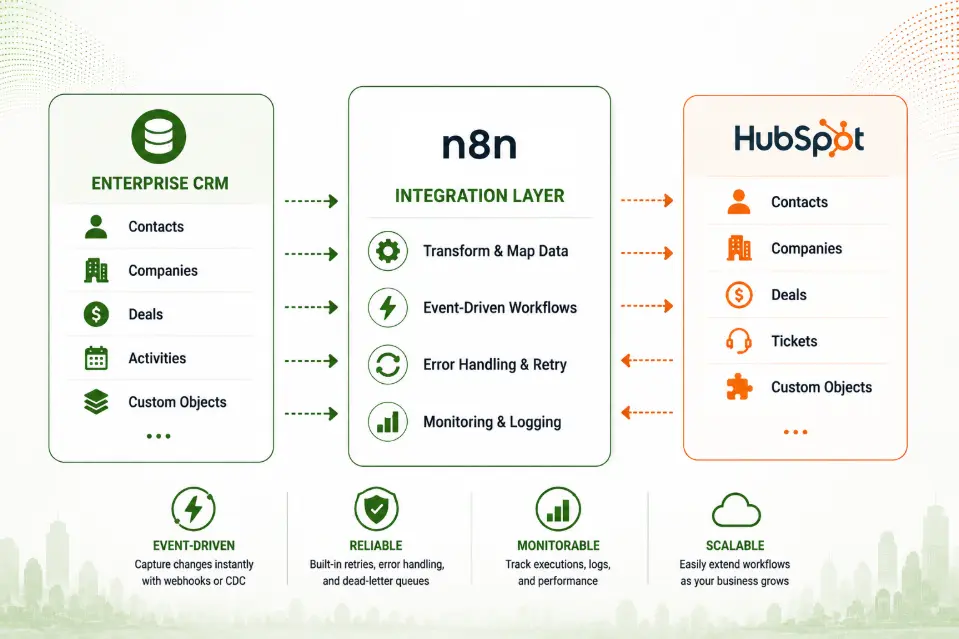
1. Different Systems Have Different Data Models
One of the first challenges is that an internal CRM and HubSpot rarely represent business information in exactly the same way.
For example, an internal CRM may have a customer structure such as:
Customer
├── Company
├── Contact
├── Account Manager
├── Customer Type
├── Status
└── Business Information
HubSpot, meanwhile, organizes information around objects such as:
- Contacts
- Companies
- Deals
- Tickets
- Custom Objects
Even when two systems appear to store the same information, their underlying structures may be different.
A field called: customer_status in one system may not have a direct equivalent in HubSpot. It may need to be represented through:
- Lifecycle Stage
- Lead Status
- A custom property
- A combination of multiple properties
This means integration cannot simply be treated as a field-to-field mapping exercise. The team needs to understand the business meaning behind the data.
2. Data Mapping Is More Than Matching Field Names
Data mapping is one of the most important parts of an enterprise HubSpot project.
A simple example might look like:
| Internal CRM | HubSpot |
|---|---|
| Customer Name | Contact Name |
| Email Address | |
| Company Name | Company |
| Customer Status | Lifecycle Stage |
| Industry | Industry |
| Account Manager | Custom Property |
But real-world mappings are often more complicated. For example, one internal field may need to be transformed before being sent to HubSpot.
| Internal CRM | HubSpot |
|---|---|
Customer Type │ ├── Enterprise ├── SME └── Partner | customer_type │ ├── Enterprise ├── SMB └── Partner |
The mapping layer therefore needs to define not only where the data goes, but also how it should be transformed. This is why we typically define the data model and mapping rules before implementing the integration itself.
3. Duplicate Contacts and Companies
Duplicate data is another common challenge.
A Contact may already exist in HubSpot before the CRM integration is introduced. The same person may also exist in:
- Internal CRM
- Marketing database
- Website
- Event registration system
- Spreadsheet
- Previous CRM platform
For example: [email protected]
- Internal CRM → John Smith
- HubSpot → John Smith
- Event System → J. Smith
- Website → John S.
These may all represent the same individual. If the integration does not have a clear identification strategy, it may create multiple records instead of updating the existing Contact. This can lead to:
- Duplicate contactuss
- Incorrect activity history
- Fragmented customer information
- Incorrect reporting
- Multiple marketing communications
Therefore, enterprise HubSpot projects need a clear strategy for identifying existing records before creating new ones.
4. Choosing the Right Unique Identifier
A particularly important question is: How do we know that two records represent the same customer?
Email address may work well for some Contact scenarios, but it is not always sufficient for every business object or process. Companies may have:
- Multiple domains
- Multiple locations
- Subsidiaries
- Shared email addresses
- Changing contactus information
Internal systems may also have their own unique identifiers. For example:
| Internal CRM | HubSpot |
|---|---|
| Customer ID: C-10482 | External Customer ID: C-10482 |
Maintaining a reliable identifier between systems can make synchronization much safer. Instead of relying only on names or other changeable attributes, the integration can use a stable business identifier to locate the corresponding record.
5. Inconsistent Data Quality
Enterprise data often contains information that was created over many years by different teams and systems. As a result, the same type of information may be stored in different formats.
For example: Industry
Technology = technology = TECH = IT = Information Technology = Tech Industry
From a human perspective, these values may be understood as the same or similar.
From a system perspective, they are different values. The same problem can occur with:
- Country
- Job title
- Company type
- Lead status
- Customer category
- Phone numbers
- Addresses
- Dates
If these values are transferred directly into HubSpot without normalization, the resulting dataset may be difficult to segment, report on, or automate.
Data quality therefore needs to be considered before and during synchronization, not only after the migration is complete.
6. Historical Data Can Be Difficult to Migrate
Enterprise organizations often have years of historical customer data. The question is not simply: "Can we move all of it to HubSpot?"
A better question is: "Which historical data actually needs to be moved, and in what form?"
An organization may have:
- Current Contacts
- Former customers
- Old Deals
- Historical activities
- Archived records
- Legacy custom fields
- Data from previous CRM platforms
Migrating everything may increase complexity without providing meaningful business value. On the other hand, migrating too little may result in the loss of information required for sales, reporting, or compliance.
A proper migration strategy should therefore distinguish between:
- Data that must be migrated
- Data that should be migrated
- Data that can remain in the legacy system
This is both a technical and a business decision.
7. Deciding Which System Owns the Data
One of the most important questions in a multi-system environment is: Which system is the source of truth?
This becomes particularly important when data is synchronized in both directions. For example:
| Internal CRM | HubSpot |
|---|---|
| Customer Status = Active | Customer Status = Prospect |
If both systems can update the same property, the integration needs a defined rule for resolving the conflict. Possible approaches include:
- CRM is the source of truth.
- HubSpot is the source of truth.
- Different systems own different properties.
- The latest valid update wins.
- Certain fields can only be modified by specific systems.
There is no universal answer. The correct model depends on the organization's business processes.
What matters is that data ownership is explicitly defined.
8. Two-Way Synchronization Creates Data Conflicts
Two-way synchronization provides flexibility, but it also introduces additional complexity.
Consider this scenario:
CRM
Customer Status = Active
↓
HubSpot
Customer Status = Active
↓
Sales updates HubSpot
Customer Status = Customer
↓
CRM receives update
This is straightforward when only one system changes the data. But what happens when both systems are updated around the same time? Without clearly defined ownership and conflict-resolution rules, one update can unintentionally overwrite another.
This is why two-way synchronization needs to be designed together with the underlying data governance model.
9. Custom Properties Can Grow Out of Control
HubSpot provides flexibility through custom properties and custom objects. This flexibility is valuable, but it can also create another challenge.
When every new business requirement results in another custom property, the data model can gradually become difficult to manage. For example:
- customer_type
- customer_type_new
- customer_type_v2
- customer_segment
- customer_segment_new
- customer_category
- customer_category_old
Over time, teams may no longer know which property is authoritative. A scalable HubSpot implementation therefore needs data governance. Before creating a new property, it is useful to ask:
- Does an existing property already serve this purpose?
- Who owns the property?
- Is it required for integration?
- What values are allowed?
- Which workflows depend on it?
- Will it be synchronized with another system?
- Is it needed for reporting?
The goal is not to minimize the number of properties at all costs. The goal is to maintain a clear and purposeful data model.
10. Data Challenges Affect Automation
Poor-quality data does not only create reporting problems. It can also break marketing and sales automation.
For example, imagine a workflow:
IF Lifecycle Stage = Qualified Lead THEN Send Sales Notification
If the same business status appears in the database as:
- Qualified
- qualified
- Qualified Lead
- QL
the workflow may not behave as expected.
Similarly, incorrect or missing properties can affect:
- Contact segmentation
- Email personalization
- Lead scoring
- Workflow enrollment
- Sales notifications
- Reporting
- Campaign targeting
This is why data quality is closely connected to the success of HubSpot automation. Good automation depends on good data.
11. Data Synchronization Is Not the Same as Data Governance
Another important distinction is between data synchronization and data governance.
- Synchronization answers: How does information move between systems?
- Data governance answers: What information should exist, who owns it, how should it be structured, and how should it be used?
An integration can successfully synchronize poor-quality data. For example:
| Internal CRM | HubSpot |
|---|---|
| "USA" | "USA" |
Technically, the integration worked. But if the organization expects the standardized value to be: "United States" the integration has simply moved an existing data-quality problem from one system to another.
This is why enterprise HubSpot projects need both: Integration engineering and Data governance.
Common Data Mistakes We See
Based on our experience working with enterprise systems, several patterns appear repeatedly.
1. Starting With API Development Too Early
Teams sometimes begin by asking: "Which HubSpot API should we use?" before answering: "What exactly are we trying to synchronize?"
The data model and business rules should come first.
2. Assuming Matching Field Names Means Matching Data
Two properties can have the same name while representing different business concepts. Understanding the meaning of each field is more important than matching labels.
3. Creating New Records Without Checking Existing Data
Without a reliable identification strategy, synchronization can quickly create duplicate Contacts and Companies.
4. Synchronizing Every Field
Not every field needs to move between systems. Synchronizing unnecessary data increases complexity and creates more opportunities for conflicts.
5. Letting Both Systems Modify Everything
If every system can modify every synchronized property, conflict resolution becomes significantly more difficult. Clear data ownership is essential.
6. Treating Data Cleanup as a One-Time Task
Data quality is not something that can always be fixed once before launch.
- New records continue to enter the system.
- New business processes are introduced.
- New integrations are added.
Data governance therefore needs to continue after implementation.
How We Approach Data Challenges at BHSoft
At BHSoft, we treat data as a core part of the integration architecture rather than simply an input to an API.
Our approach typically includes several stages.
1. Understand the Existing Data
We first identify:
- Data sources
- Business objects
- Existing identifiers
- Data relationships
- Existing workflows
- Current data quality issues
2. Define the Target HubSpot Model
We then determine how the existing business concepts should be represented in HubSpot through:
- Standard Objects
- Custom Properties
- Custom Objects
- Associations
3. Define Data Ownership
For important properties, we identify which system should be responsible for maintaining the value.
4. Establish Mapping and Transformation Rules
This defines:
- Field mapping
- Value mapping
- Data normalization
- Validation
- Business rules
5. Define Synchronization Rules
We determine:
- What should be synchronized
- In which direction
- When synchronization should occur
- What happens when data conflicts
6. Validate and Reconcile
After implementation, we verify that the data behaves as expected and establish mechanisms to identify inconsistencies over time.
This approach helps ensure that the integration is not simply moving data, but moving meaningful and usable data.
From Data Integration to Data Confidence
The ultimate goal of an enterprise HubSpot project is not to have the most sophisticated integration. It is to give the business confidence that the information inside HubSpot can be trusted.
- Sales should be able to trust customer information.
- Marketing should be able to trust segmentation.
- Management should be able to trust reports.
- Automation should be able to trust the properties driving its workflows.
- And the enterprise should be able to trust that important information remains consistent across its systems.
This is why data architecture is such an important part of HubSpot implementation.
Conclusion
Enterprise HubSpot projects often involve much more than connecting a CRM to a marketing platform. They involve bringing together data that has been created across different systems, teams, processes, and years of business operations.
The biggest challenges often come from:
- Different data models
- Data mapping
- Duplicate records
- Inconsistent data
- Historical data
- Unique identifiers
- Data ownership
- Two-way synchronization
- Custom property management
- Data governance
These challenges cannot be solved by API integration alone. They require a combination of business understanding, data modeling, integration architecture, and software engineering.
At BHSoft, we approach HubSpot integration with this broader perspective. Our goal is not simply to connect systems, but to create a reliable data foundation that allows CRM, marketing, sales, and business operations to work together more effectively. Because when enterprise systems are connected but the data is not trustworthy, the integration is only doing half the job.
Looking for an Enterprise HubSpot Partner?
Whether you need to migrate existing CRM data, synchronize HubSpot with an internal system, clean up complex customer data, or design a scalable data architecture, BHSoft can help.
Our team combines HubSpot expertise, enterprise integration experience, data engineering, and custom software development to build solutions around your existing business environment. Contact BHSOFT today to discuss your project!