Why We Use n8n as the Integration Layer Between Enterprise Systems and HubSpot
10 minutes read
Aug 17, 2026
Connecting HubSpot to an enterprise CRM may look straightforward at first. A CRM has an API. HubSpot has an API. Data needs to move between the two systems. So why not simply connect them directly? The answer becomes clear as soon as the integration grows beyond a few simple API calls.
Enterprise systems rarely operate with a single data source or a handful of straightforward workflows. A typical environment may include an internal CRM, databases, websites, marketing platforms, ERP systems, third-party applications, internal APIs, and multiple business processes that all need to exchange information. As the number of systems and workflows increases, putting integration logic directly inside each application can quickly become difficult to maintain.
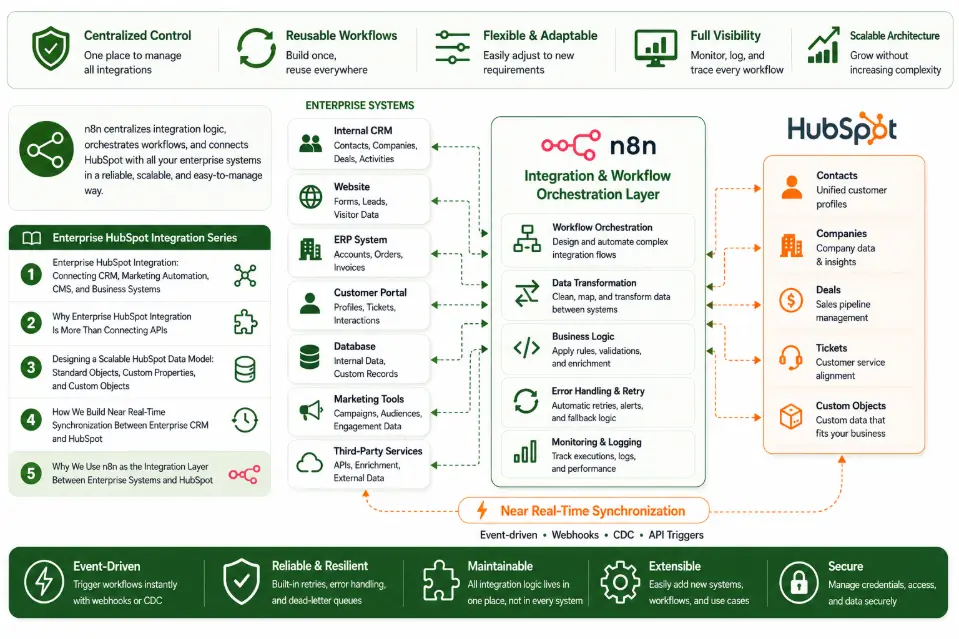
This is why, in our HubSpot integration projects, we use n8n as an integration and workflow orchestration layer between HubSpot and enterprise systems. Rather than allowing every system to communicate directly with every other system, n8n provides a centralized place to handle data transformation, validation, workflow logic, API communication, and error handling. The result is an integration architecture that is easier to understand, maintain, monitor, and extend.
Building on the Enterprise HubSpot Integration Architecture
Before looking at the role of n8n, it is important to understand the bigger picture.
In the first article of our Enterprise HubSpot Integration series, we explored how HubSpot can be connected with enterprise CRM, marketing automation, CMS, and other business systems to create a more unified data ecosystem.
We then looked at why enterprise integration requires much more than simply connecting APIs.
Read Article #2: Why Enterprise HubSpot Integration Is More Than Connecting APIs
From there, we examined the data model itself and how Standard Objects, Custom Properties, and Custom Objects can provide a structured foundation for synchronization.
Finally, we explored how near real-time synchronization can be implemented between an enterprise CRM and HubSpot.
Read Article #4: How We Build Near Real-Time Synchronization Between Enterprise CRM and HubSpot
In this article, we take the next step:
How do we organize all of that integration logic so that the architecture remains manageable as the system grows?
This is where the integration layer becomes important.
What Is an Integration Layer?
An integration layer is a software layer that sits between different systems and manages how they exchange information.
Instead of building direct connections such as:
CRM ─────────────── HubSpot
CRM ─────────────── ERP
CRM ─────────────── Website
HubSpot ─────────── Website
HubSpot ─────────── ERP
the architecture can introduce a centralized integration layer:
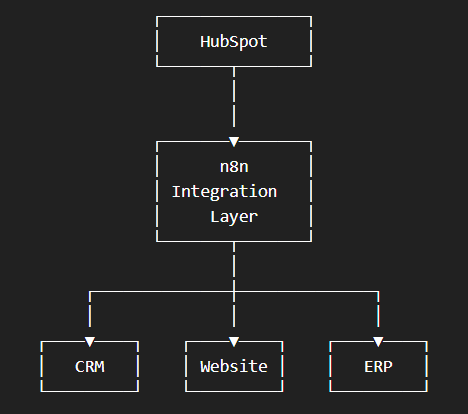
The integration layer becomes responsible for coordinating communication between the different systems.
Why Direct System-to-System Integration Becomes Difficult
Direct integrations are not necessarily wrong. For a small integration with a simple data flow, connecting two systems directly can be perfectly reasonable.
The problem appears when the number of systems and workflows grows. Imagine an enterprise environment with:
- Internal CRM
- HubSpot
- Website
- ERP
- Customer portal
- Internal database
- Marketing tools
- Third-party services
If every system communicates directly with every other system, the number of dependencies can grow quickly:
- A change in one system may require changes in several integrations.
- A new business rule may need to be implemented in multiple places.
- An API failure may be difficult to trace.
- A data transformation may be duplicated across different integrations.
Over time, the architecture becomes increasingly difficult to understand. This is sometimes referred to as point-to-point integration. The problem is not that point-to-point integration cannot work. The problem is that it can become expensive to maintain as the integration landscape grows.
What n8n Does in the Architecture
In our projects, n8n acts as an orchestration layer that connects different systems and manages the flow of information between them.
A simplified workflow might look like:
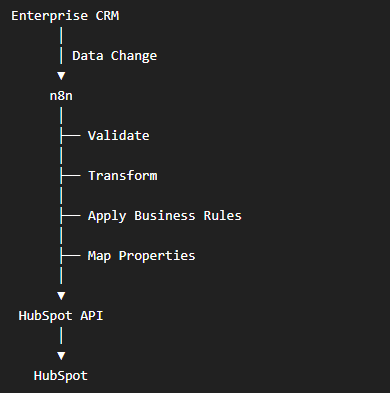
The same principle can work in the opposite direction:
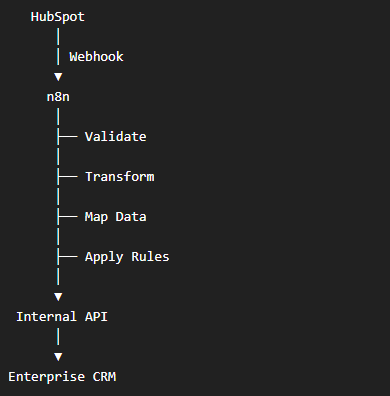
Instead of embedding all of these rules inside the CRM or HubSpot integration itself, the integration layer becomes the central place where they are managed.
1. Centralizing Data Mapping
One of the most important responsibilities of an integration layer is data mapping. Enterprise systems and HubSpot may use different property names, formats, values, and structures.
For example:
| Enterprise CRM | HubSpot |
|---|---|
| customer_name | firstname / lastname |
| company_name | company |
| customer_status | lifecyclestage |
| industry_code | Custom Property |
| account_manager | Custom Property |
The actual mapping can become much more complex as the business grows. Instead of implementing these transformations separately across multiple applications, n8n can provide a centralized workflow for:
- Field mapping
- Data transformation
- Format conversion
- Value normalization
- Property validation
- Business-rule processing
This creates a clearer separation between the source system's data model and HubSpot's data model.
2. Data Validation Before Synchronization
Not every record should automatically be sent to another system. A CRM may contain incomplete or inconsistent data.
For example:
- Missing email address
- Invalid email format
- Missing company identifier
- Unsupported industry value
- Incorrect date format
- Invalid lifecycle status
- Duplicate records
Sending invalid data directly to HubSpot can create downstream problems. An integration workflow can validate information before making the API request.
A simplified process might be:
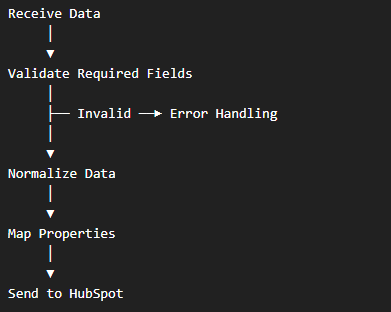
This allows data quality checks to become part of the synchronization process rather than an afterthought.
3. Applying Business Rules
Data synchronization is rarely just:
"Copy field A into field B."
Business requirements often determine when, how, and whether a record should be synchronized.
For example:
- Only synchronize active customers.
- Send leads to HubSpot when they reach a particular stage.
- Do not overwrite certain CRM-controlled properties.
- Synchronize a company only when required fields are complete.
- Trigger different workflows based on customer type.
- Apply different mappings for different business units.
These rules can be incorporated into the integration workflow. This means the integration layer can act as the place where technical data movement meets business logic.
4. Connecting Multiple Systems
One of the biggest advantages of using an integration layer is the ability to connect multiple systems through a common architecture.
For example:
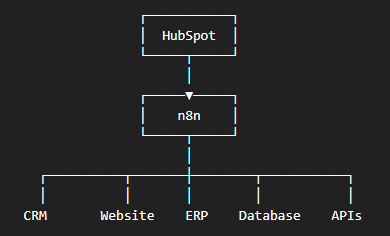
When a new system needs to be connected, the integration layer provides an existing architectural point where the new workflow can be introduced.
This can be particularly useful when HubSpot is part of a larger enterprise technology ecosystem rather than a standalone CRM.
5. Supporting Event-Driven Workflows
Enterprise integrations increasingly need to respond to events rather than relying entirely on scheduled data transfers.
For example: CRM record updated → Integration workflow triggered → Data validated → HubSpot record updated
Similarly: HubSpot Contact updated → Workflow triggered → Webhook sent → n8n processes the event → CRM updated
This event-driven approach can reduce unnecessary database scanning and help information move between systems with lower latency.
Combined with the synchronization architecture described in Article #4, the integration layer becomes an important part of maintaining near real-time data consistency.
6. Handling Errors and Exceptions
One of the most overlooked parts of integration development is error handling. A successful API request is only one possible outcome.
An integration can fail because:
- The API is temporarily unavailable.
- Authentication expires.
- Required data is missing.
- A property value is invalid.
- The target record does not exist.
- A rate limit is reached.
- A business rule rejects the update.
- A third-party service returns an unexpected response.
Without proper error handling, these failures can silently create data inconsistencies. An integration workflow should therefore account for:
- Validation failures
- API failures
- Retry logic
- Error notifications
- Failed workflow tracking
- Logging
- Recovery processes
The goal is not simply to make the happy path work. It is to make the system recoverable when something goes wrong.
7. Improving Visibility into Integration Workflows
Another benefit of centralizing integration workflows is visibility. When integration logic is distributed across multiple applications, it can be difficult to determine:
Where did the synchronization fail?
With an integration layer, workflows can be organized around specific business processes. For example:
- CRM → HubSpot Contact Sync
- CRM → HubSpot Company Sync
- HubSpot → CRM Contact Update
- HubSpot → CRM Lifecycle Update
- Website → HubSpot Lead Creation
- HubSpot → Internal Notification
This makes it easier for development and operations teams to understand what each workflow is responsible for.
It also creates a clearer foundation for monitoring and troubleshooting.
Why We Don't Put Everything Inside HubSpot
HubSpot provides powerful automation capabilities through features such as Workflows, Webhooks, APIs, and other platform capabilities. For many business processes, those native capabilities are exactly what an organization needs.
However, enterprise integration can involve systems and business rules that extend beyond HubSpot. For example, an organization may need to:
- Transform data before sending it to HubSpot.
- Connect several internal systems.
- Apply complex mapping rules.
- Reuse the same integration logic across multiple workflows.
- Integrate with internal APIs.
- Coordinate processes that involve systems outside HubSpot.
In these situations, putting all integration logic inside HubSpot can create unnecessary coupling. The objective is therefore not to replace HubSpot's native automation. It is to use HubSpot where it makes sense and use the integration layer where cross-system orchestration is required.
n8n and HubSpot: Complementary, Not Competing
A useful way to think about the relationship is:
HubSpot focuses on:
- CRM
- Marketing
- Sales
- Customer data
- Workflows
- Customer-facing processes
n8n focuses on:
- System integration
- Data transformation
- Workflow orchestration
- API communication
- Cross-system automation
- Integration logic
Together, they can provide a more flexible architecture.
For example:
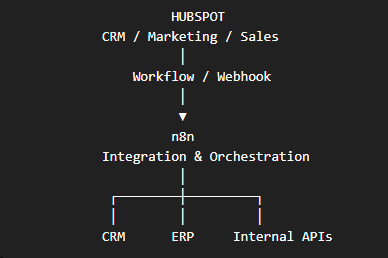
Each system remains responsible for what it does best.
Why This Architecture Helps as the Business Grows
Integration requirements rarely stay static.
A company may start with: CRM ↔ HubSpot
Later, it may need: CRM ↔ HubSpot ↔ Website
Then: CRM ↔ HubSpot ↔ Website ↔ ERP
And eventually: CRM ↔ HubSpot ↔ Website ↔ ERP ↔ Data Platform ↔ Customer Portal ↔ Third-Party Services
If the architecture was designed only for the original two systems, every new requirement can create additional complexity. An integration layer provides a more structured foundation for expansion. New workflows can be introduced without fundamentally changing the architecture of every connected system.
The Architecture We Use at BHSoft
At BHSoft, we typically approach enterprise HubSpot integration as a combination of several layers.
1. Source Systems
The systems where business data originates. Examples include:
- Internal CRM
- ERP
- Website
- Database
- Customer portal
2. Event and Trigger Layer
The mechanisms that detect changes. Examples include:
- Change Data Capture
- Webhooks
- HubSpot Workflows
- API events
- Scheduled processes
3. Integration Layer
This is where n8n plays a central role. It handles:
- Mapping
- Validation
- Transformation
- Business rules
- API calls
- Workflow orchestration
- Error handling
4. Destination Systems
The systems that consume the processed information. For example:
- HubSpot
- Internal CRM
- ERP
- Data platforms
- Other enterprise applications
5. Monitoring and Operations
The final layer focuses on understanding whether the integration is working as expected. This can include:
- Workflow monitoring
- Logs
- Error tracking
- Notifications
- Reconciliation processes
- Operational reporting
This layered approach helps separate responsibilities and makes the overall architecture easier to maintain.
n8n Is Not a Replacement for Software Engineering
It is also important to clarify one thing. Using n8n does not mean that enterprise integration becomes a no-code exercise.
Complex integrations still require engineering decisions around:
- Architecture
- Data modeling
- APIs
- Authentication
- Security
- Error handling
- Scalability
- Performance
- Data consistency
- Monitoring
n8n provides the integration framework and workflow capabilities. The quality of the resulting system still depends on how those capabilities are designed and implemented. This distinction is particularly important for enterprise environments where integrations become part of critical business processes.
When Should You Use an Integration Layer?
Not every HubSpot project needs one. A direct integration may be sufficient when:
- There are only two systems.
- Data flows are simple.
- There is limited transformation.
- Business rules are minimal.
- The integration is unlikely to expand.
An integration layer becomes increasingly valuable when:
- Multiple systems need to communicate.
- Data requires complex transformation.
- There are many synchronization workflows.
- Business rules are becoming more sophisticated.
- Near real-time synchronization is required.
- Error handling and monitoring are important.
- The integration needs to scale over time.
The right architecture depends on the complexity of the environment not simply on the number of tools being used.
Beyond Connecting Systems: Building an Integration Architecture
A successful HubSpot integration should not be measured by how quickly two APIs can exchange data. It should be evaluated by how well the architecture supports the business over time.
A good integration architecture should make it easier to: Connect → Transform → Validate → Synchronize → Monitor → Scale
This is why we treat integration as an architectural discipline rather than simply an API development task. n8n is one of the technologies we use to support that approach, providing a flexible integration layer that can connect HubSpot with enterprise systems while keeping synchronization and workflow logic organized.
Conclusion
Enterprise HubSpot integration becomes increasingly complex as more systems, data sources, and business workflows are introduced.
Direct system-to-system integrations may work for simple scenarios, but they can become difficult to maintain as the environment grows. An integration layer provides a way to centralize:
- Data mapping
- Transformation
- Validation
- Business rules
- API communication
- Workflow orchestration
- Error handling
- Monitoring
At BHSoft, we use n8n as an integration layer in appropriate HubSpot projects because it helps us build architectures that are flexible, maintainable, and easier to extend.
But the technology itself is only part of the solution. The real value comes from designing the right architecture around the business requirements.
HubSpot manages customer engagement. Enterprise systems manage business operations. The integration layer connects the two. That connection is what turns separate applications into a coordinated digital ecosystem.
Looking for an Enterprise HubSpot Partner?
BHSoft helps businesses connect HubSpot with internal CRM systems, websites, ERP platforms, databases, and other enterprise applications. Our approach combines:
- Enterprise integration architecture
- HubSpot development
- API integration
- Data synchronization
- Workflow automation
- n8n integration
- Custom software engineering
Whether you need to synchronize an existing CRM with HubSpot, connect multiple enterprise systems, or build a scalable integration architecture from the ground up Contact BHSOFT today to discuss your project!