Lifecycle Stage Best Practices for Enterprise HubSpot
15 minutes read
September 16, 2026
Lifecycle stages are one of the most important concepts in HubSpot CRM.
They provide a structured way to understand where contacts and companies are in the customer journey from initial engagement through qualification, opportunity, and customer relationship.
But lifecycle stages are also one of the areas where enterprise HubSpot implementations can become inconsistent. If marketing, sales, CRM, and external systems use different definitions of a "lead," "qualified lead," or "customer," the CRM can quickly become difficult to trust. The result can be:
- Incorrect segmentation
- Broken automation
- Poor lead handoffs
- Inaccurate reporting
- Incorrect personalization
- Confusing sales pipelines
- Data synchronization problems
The key principle is: Lifecycle stages should represent a clearly defined business process, not simply a collection of labels in the CRM.
What Are HubSpot Lifecycle Stages?
HubSpot lifecycle stages categorize contacts and companies according to where they are in the marketing and sales process.
The standard lifecycle stages include:
- Subscriber
- Lead
- Marketing Qualified Lead
- Sales Qualified Lead
- Opportunity
- Customer
- Evangelist
- Other
HubSpot describes these stages as a way to understand how contacts and companies move through marketing and sales processes.
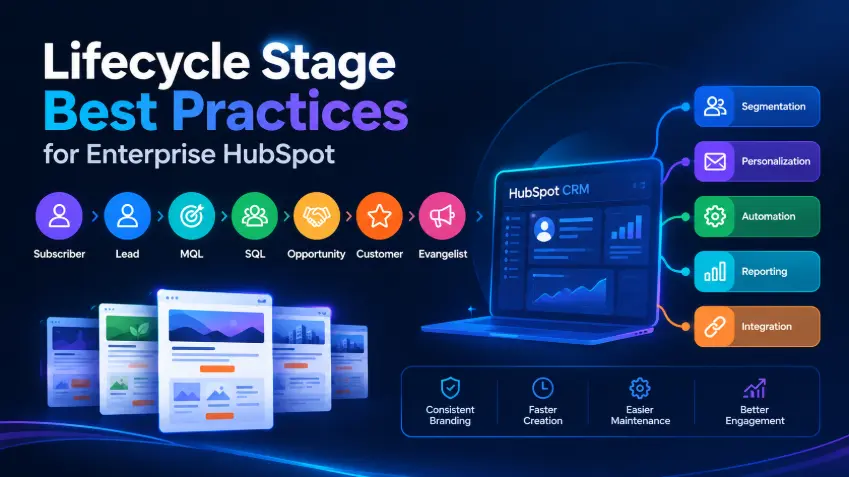
A simplified journey looks like: Subscriber → Lead → MQL → SQL → Opportunity → Customer → Evangelist
The exact journey will differ between businesses. That is why lifecycle stage design should begin with the organization's actual customer journey rather than simply accepting the default stages without analysis.
Lifecycle Stage Is Not the Same as Lead Status
One of the most important distinctions in HubSpot is between Lifecycle Stage and Lead Status.
They answer different questions.
Lifecycle Stage | Lead Status |
|---|---|
Where is this contact or company in the overall customer journey? For example:
| What is happening with this sales-qualified lead right now? HubSpot's default Lead Status options include:
|
Lead Status operates as a more detailed layer within the Sales Qualified Lead lifecycle stage. This distinction prevents teams from creating too many lifecycle stages simply to represent sales activity.
Start With Business Definitions
Before configuring HubSpot, define what each lifecycle stage means for the organization.
For example:
Stage | Business Definition |
|---|---|
| Subscriber | Has opted in to receive ongoing communication |
| Lead | Has demonstrated an interaction beyond basic subscription |
| MQL | Marketing considers the contact ready for sales |
| SQL | Sales considers the contact qualified |
| Opportunity | Contact/company is associated with a potential deal |
| Customer | At least one deal has closed |
| Evangelist | Customer actively advocates for the company |
These definitions should be agreed upon by marketing, sales, and operations. The exact definitions should reflect the organization's actual process.
Do Not Use Lifecycle Stage as a General-Purpose Status Field
A common mistake is using lifecycle stages to represent every possible state.
For example:
- Lead
- Interested
- Contacted
- Demo Requested
- Proposal Sent
- Negotiating
- Customer
This mixes different concepts:
- "Lead" and "Customer" describe lifecycle position.
- "Contacted" describes sales activity.
- "Proposal Sent" describes deal progress.
- "Negotiating" describes opportunity status.
These should not necessarily be represented by one property.
A better model separates them:
- Lifecycle Stage
- Lead Status
- Deal Pipeline Stage
- Other Business Properties
Each property has a specific responsibility.
Lifecycle Stage and the Sales Pipeline Are Different
This distinction becomes especially important in B2B organizations.
Consider a company: Company → Opportunity → Deal
The company can have a lifecycle stage such as Opportunity while the associated deal can move through:
Qualification → Discovery → Proposal → Negotiation → Closed Won
- The lifecycle stage describes the customer's broader relationship with the organization.
- The deal pipeline describes the progress of a specific commercial opportunity.
Keeping these concepts separate makes reporting and automation much easier.
Define Entry Criteria for Every Stage
Every lifecycle stage should have a clear answer to: What causes a record to enter this stage?
For example:
- Subscriber with possible entry condition as Subscribes to newsletter
- Lead with possible entry condition as Completes a lead-generation form
- MQL with possible entry condition as Meets agreed marketing qualification criteria
- SQL with possible entry condition as Sales accepts the lead as qualified
- Opportunity with possible entry condition as Associated with a qualified deal
- Customer with possible entry condition as Associated deal reaches Closed Won
These rules should be documented before automation is built.
Define Ownership of Lifecycle Changes
A lifecycle stage should not change simply because multiple systems happen to write different values.
For every stage, determine:
- Who owns the definition?
- Who can change it?
- What system is the source of truth?
- What event triggers the change?
- Can it move backward?
- Can automation update it?
- Can external systems update it?
For example:
Stage | Primary Owner | Possible Trigger |
|---|---|---|
| Subscriber | Marketing | Subscription |
| Lead | Marketing | Conversion |
| MQL | Marketing | Qualification criteria |
| SQL | Sales | Sales acceptance |
| Opportunity | Sales | Deal creation |
| Customer | Sales / CRM | Closed-won deal |
The exact ownership model should reflect the organization.
Automate Lifecycle Stages Carefully
HubSpot allows lifecycle stages to be updated through workflows and other automation mechanisms.
HubSpot also supports automatic lifecycle-stage synchronization in certain relationships, such as when deals are created or when company lifecycle stages are synchronized with associated contacts. Automation can be extremely useful.
For example: Deal Created → Contact / Company → Opportunity
But automation should follow clearly defined business rules. Otherwise, multiple workflows can begin competing with each other.
Be Careful With Multiple Sources of Truth
Enterprise HubSpot environments often integrate with other systems.
For example: CRM ↔ HubSpot ↔ Marketing Automation ↔ Data Warehouse
Now an important question appears: Which system owns lifecycle stage?
If the CRM says Customer while HubSpot says MQL and another system says Lead, the organization no longer has a reliable customer journey.
This is why lifecycle stage should be treated as part of the enterprise data model, not just a HubSpot configuration.
Define a Clear Source of Truth
For every important lifecycle property, document: Property → System of Record → Allowed Values → Update Rules → Synchronization Rules
For example: Lifecycle Stage → HubSpot → Subscriber / Lead / MQL / SQL / ... → Workflow + Sales Actions → Sync to External Systems
There is no universal answer. The important thing is that the ownership model is explicit.
Lifecycle Stages and Segmentation
Lifecycle stage becomes much more valuable when it is used consistently for segmentation.
For example: Audience → Lifecycle Stage = MQL → Industry = Manufacturing → Country = Vietnam
This can produce a highly targeted audience. The quality of these segments depends on the quality and consistency of the underlying CRM data.
Lifecycle Stage and Marketing Automation
Lifecycle stages can also become triggers for marketing automation.
For example: Lead → Educational Nurture → MQL → Sales Notification → SQL → Sales Process → Opportunity → Customer → Customer Engagement
This creates a connection between CRM state and marketing activity. But the automation should be designed carefully. A lifecycle-stage change should have a meaningful business purpose. It should not trigger dozens of unrelated actions simply because a property changed.
Lifecycle Stage and Personalization
Lifecycle stage can also influence the content a contact receives:
- A subscriber may need educational content
- A lead may receive problem / solution content
- An MQL may receive product information, case studies, demo CTA
- A customer may receive product updates, customer education, cross-sell / upsell
This creates a more relevant customer experience. But again, lifecycle stage should be combined with other context. Lifecycle stage alone rarely provides enough information for highly personalized communication.
Lifecycle Stage and Reporting
One of the strongest reasons to standardize lifecycle stages is reporting.
For example: Subscribers → Leads → MQLs → SQLs → Opportunities → Customers
The organization can then ask:
- How many leads become MQLs?
- How many MQLs become SQLs?
- How many SQLs become opportunities?
- How many opportunities become customers?
- How long do records stay in each stage?
- Where is the biggest conversion drop?
- Which channels generate the best opportunities?
HubSpot provides lifecycle-stage-related reporting and calculated properties that can be used to analyze time spent in stages and build workflow/reporting logic. Without standardized definitions, these reports become much less meaningful.
Lifecycle Stage in Enterprise Integrations
Lifecycle stage also becomes important when HubSpot is connected to external applications.
For example: Enterprise CRM ↔ Integration ↔ HubSpot ↔ Marketing Automation
The integration should define:
- Field mapping: CRM Lifecycle ↔ HubSpot Lifecycle Stage
- Value mapping: CRM Prospect → HubSpot Lead
- Update direction
- CRM → HubSpot
- HubSpot → CRM
- Bidirectional
- Conflict handling: What happens if both systems update the value?
- Timing: Should the synchronization happen
- Real time?
- Near real time?
- Scheduled?
- Event driven?
These decisions should be made during integration design, not after synchronization problems appear.
Lifecycle Stage Should Usually Move Forward Deliberately
HubSpot's automatic lifecycle-stage updates are designed to move records forward through the default stage sequence. This is useful because it protects the general progression: Subscriber → Lead → MQL → SQL → Opportunity → Customer
However, real businesses are more complicated. A prospect may:
- Become inactive
- Return months later
- Lose an opportunity
- Become a customer
- Leave the company
- Start a new opportunity
Therefore, teams should distinguish between lifecycle position and current engagement or sales status. This is another reason not to overload Lifecycle Stage with every possible business state.
What About Leads That Go Cold?
A common question is: If an MQL stops responding, should we move them backward to Lead?
There is no universal answer. Instead, define the business rule.
For example: MQL → No engagement → Lead Status = Bad Timing rather than automatically changing the lifecycle stage.
HubSpot's Lead Status property is specifically intended to represent sub-stages within the Sales Qualified Lead lifecycle stage. This separation can preserve the historical customer journey while still showing the current sales situation.
Custom Lifecycle Stages: When Do You Need Them?
HubSpot allows organizations to create custom lifecycle stages when the default stages do not adequately represent their process. However custom stages should solve a real business requirement, not simply reflect every internal process step.
Before creating a custom stage, ask:
1. Is this truly a lifecycle concept?
2. Does it represent a meaningful change in the relationship?
3. Will marketing use it?
4. Will sales use it?
5. Will reporting depend on it?
6. Does another HubSpot property already represent this information?
If the answer is no, another property may be more appropriate.
Common Mistakes We See
1. Using Lifecycle Stage as a Sales Status
"Contacted," "Demo Scheduled," and "Proposal Sent" do not necessarily need to be lifecycle stages. They may belong in Lead Status or the Deal Pipeline.
2. Changing Lifecycle Stage Manually Without Rules
Manual updates make reporting inconsistent. Where possible, define clear automation and ownership rules.
3. Having Multiple Systems Update the Same Property
This is particularly dangerous in integrated environments. If CRM and HubSpot can both freely overwrite lifecycle stage, data conflicts are inevitable.
4. Creating Too Many Custom Lifecycle Stages
More stages do not automatically mean better visibility. Too many stages can make the customer journey harder to understand.
5. Treating MQL and SQL as Purely Technical Labels
MQL and SQL should represent actual business agreements between marketing and sales. The teams need to agree on what qualification means.
6. Ignoring Companies in B2B Processes
In B2B environments, lifecycle management often involves both contacts and companies. The organization should define how these records relate and how lifecycle stages should be synchronized.
HubSpot supports lifecycle-stage management for both contacts and companies and provides synchronization capabilities for certain associated records.
7. Building Automation Before Defining the Data Model
This is one of the most common enterprise CRM mistakes.
The correct order is: Business Process → Lifecycle Definitions → Data Model → Ownership Rules → Automation → Reporting
Not: Create Workflow → Hope It Matches the Business
A Practical Lifecycle Stage Framework
A strong enterprise implementation can document lifecycle stages using a framework like this:
Lifecycle Stage | Definition | Entry Criteria | Owner | Typical Automation |
|---|---|---|---|---|
| Subscriber | Opted into communication | Subscription | Marketing | Welcome / nurture |
| Lead | Meaningful interaction | Conversion | Marketing | Lead nurture |
| MQL | Marketing-qualified | Qualification criteria | Marketing | Sales handoff |
| SQL | Sales-qualified | Sales acceptance | Sales | Sales follow-up |
| Opportunity | Potential commercial opportunity | Deal association | Sales | Opportunity workflows |
| Customer | Closed business | Closed-won | Sales / CRM | Customer communication |
| Evangelist | Customer advocating | Defined advocacy criteria | Marketing / Customer Success | Advocacy program |
The exact definitions should be customized to the organization's business model.
Lifecycle Stage as a Shared Business Language
The biggest value of lifecycle stages is not the property itself. It is the shared language they create:
- Marketing can say: "This campaign targets MQLs."
- Sales can say: "These are SQLs ready for follow-up."
- Management can say: "What percentage of MQLs become customers?"
- Operations can say: "The CRM is the source of truth for lifecycle stage."
- Integration teams can say: "Lifecycle stage synchronizes from the CRM to HubSpot."
Everyone is using the same concept. That is what makes the CRM useful at an organizational level.
BHSoft's Approach
At BHSoft, we treat lifecycle stages as part of the broader **enterprise data model**, not as an isolated HubSpot property.
Our approach typically starts with: Business Process → Customer Journey → Lifecycle Definitions → CRM Data Model → System Ownership → Integration Mapping → Automation → Reporting
This becomes particularly important when HubSpot is integrated with an existing CRM or other enterprise systems.
We focus on defining:
- Data ownership
- Field mapping
- Lifecycle rules
- Synchronization direction
- Automation triggers
- Exception handling
- Reporting requirements
- Data quality controls
The objective is to make HubSpot reflect the organization's actual customer journey — not create a second, disconnected version of it.
Conclusion
Lifecycle stages are one of the foundations of a scalable HubSpot implementation. But their value comes from consistency and business meaning, not simply from configuring the default options.
A strong lifecycle architecture should:
- Define every stage clearly
- Separate lifecycle from sales status
- Separate lifecycle from deal stages
- Establish ownership
- Define entry criteria
- Automate carefully
- Protect the source of truth
- Support segmentation
- Support reporting
- Work consistently across integrated systems
The goal is not to create the most detailed CRM. The goal is to create a CRM that everyone can understand and trust.
A good lifecycle model turns CRM data into a shared language for marketing, sales, operations, and technology.
Looking for an Enterprise HubSpot Partner?
Whether you need to connect HubSpot with an existing CRM, improve customer data quality, build marketing automation, or create personalized customer journeys, BHSoft can help.
Our team combines HubSpot expertise, enterprise integration experience, data engineering, and custom software development to build solutions around your existing business environment. Contact BHSOFT today to discuss your project