Building Reusable Email Systems in HubSpot
15 minutes read
September 15, 2026
As a HubSpot implementation grows, email can quickly become more complicated than it first appears.
A few marketing emails may be easy to manage manually. But once an enterprise is running newsletters, lead nurturing, event campaigns, customer communications, sales outreach, and automated workflows across multiple teams, simply creating emails one by one does not scale.
The real challenge becomes:
How do you build an email system that is reusable, consistent, flexible, and easy to maintain?
A strong HubSpot email architecture is not just a collection of templates. It is a reusable system made up of templates, modules, content structures, personalization, automation, naming conventions, and governance.
When these pieces are designed properly, marketing teams can create new campaigns faster without sacrificing brand consistency or technical quality.
What Is a Reusable Email System?
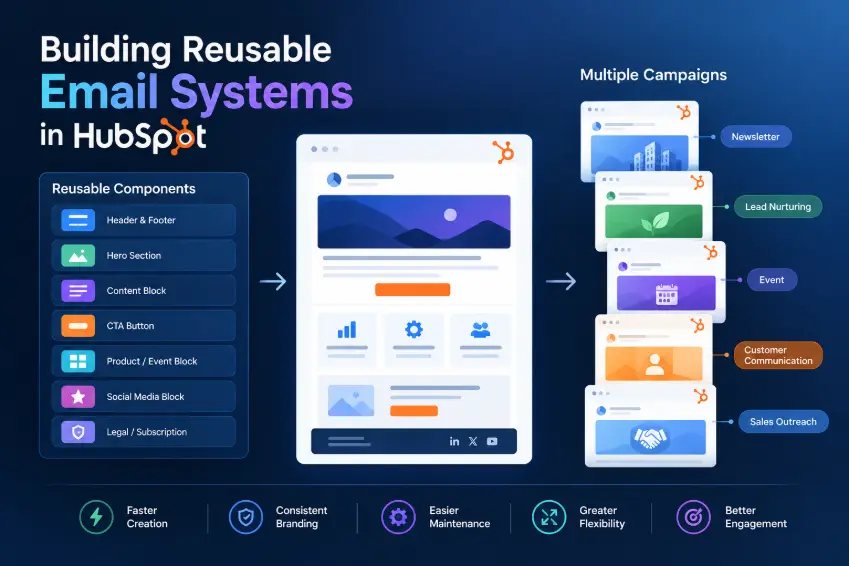
A reusable email system is a structured collection of email building blocks that can be used repeatedly across different campaigns and workflows.
Instead of designing every email from scratch, teams create reusable components such as:
- Email templates
- Custom modules
- Header and footer components
- CTA sections
- Hero sections
- Product or service blocks
- Event sections
- Social media sections
- Legal and subscription sections
- Personalization elements
- Standard email layouts
HubSpot supports reusable marketing email templates and allows marketing emails created in the drag-and-drop editor to be saved as templates for repeated use.
For more advanced implementations, HubSpot also supports custom modules for emails, allowing developers to create reusable components that content teams can configure inside the email editor.
The objective is simple: One Design → Reusable Components → Multiple Email Types → Multiple Campaigns → Consistent Experience
Why Email Systems Become Difficult to Maintain
Many HubSpot implementations start with a simple process: Marketing needs email → Create email → Copy previous email → Change content → Send
This works initially.
But over time, the system can become:
Email A
Email B
Email C
Email D
Email A - Copy
Email A - Final
Email A - Final 2
Email B - New
Email B - Updated
...
Different teams may then use different:
- Fonts
- Button styles
- Header layouts
- Footer information
- Images
- CTAs
- Spacing
- Personalization logic
- Legal information
The result is not just visual inconsistency. It also creates a maintenance problem. A change that should take minutes may require editing dozens of individual emails.
The Foundation: Separate Structure From Content
One of the most important principles when designing reusable email systems is:
Separate reusable structure from campaign-specific content.
For example:
Reusable Structure | Campaign Content |
|---|---|
Header Hero Content Section CTA Footer Subscription / Legal | Headline Copy Image Offer CTA Destination |
The structure should remain relatively stable. The campaign content should be flexible.
This allows marketing teams to create new emails without requiring developers to redesign the email every time.
Build a Modular Email Architecture
A mature email system should be built from reusable modules.
For example:
Email System
├── Global Components
├── Header
├── Footer
└── Legal
├── Content Modules
├── Hero
├── Text + Image
├── Feature List
├── Quote
├── Product
└── Event
├── Conversion Modules
├── Primary CTA
├── Secondary CTA
└── Contact CTA
└── Specialized Modules
├── Newsletter
├── Webinar
├── Product Update
└── Customer Story
This modular approach allows the same components to be reused across different campaigns.
HubSpot custom modules can be created specifically for use in emails, while global content can be reused across multiple templates and updated centrally.
Global Components vs. Flexible Components
Not every part of an email should have the same level of flexibility. A useful approach is to divide components into two categories.
Global components | Flexible components |
|---|---|
These should normally remain centrally controlled:
| These should be configurable by marketing teams:
|
If the company changes its address or legal information, the update should ideally be reflected everywhere. | This creates a balance between governance and marketing flexibility. |
Design for Marketing Teams, Not Developers
A reusable system only works if marketing teams can actually use it.
A technically sophisticated module that requires developers for every content change defeats the purpose. For example, instead of exposing:
- HTML
- CSS
- HubL
- Image URL
- Button URL
- Padding
- Margin
a marketing editor should see something closer to:
Headline [________________________]
Description [________________________]
Image [Upload Image]
Button Text [Learn More]
Button URL [________________________]
The implementation can remain technically sophisticated behind the scenes while the user experience stays simple. This is one of the biggest differences between building an email template and building an email system.
Create Different Templates for Different Purposes
A common mistake is trying to create one universal email template.
In practice, different email types have different structural requirements. For example:
| Email Type | Typical Structure |
|---|---|
| Newsletter | Multiple content sections |
| Product announcement | Hero + features + CTA |
| Event invitation | Event details + registration CTA |
| Webinar reminder | Short information + meeting details |
| Lead nurturing | Educational content + CTA |
| Customer communication | Personalized message + relevant action |
| Promotional campaign | Offer + CTA |
| Internal communication | Simple branded structure |
A reusable system should provide enough templates to support these use cases without creating unnecessary duplication.
Use Naming Conventions
Reusable systems become difficult to manage when nobody knows what each template is for. A naming convention can solve this.
For example:
- EMAIL / Newsletter / Standard
- EMAIL / Event / Registration
- EMAIL / Event / Reminder
- EMAIL / Product / Announcement
- EMAIL / Nurture / Educational
- EMAIL / Customer / Update
For modules:
- MOD / Hero / Standard
- MOD / CTA / Primary
- MOD / Content / Image Left
- MOD / Content / Image Right
- MOD / Event / Details
- MOD / Product / Feature
This makes the system easier to search, understand, and maintain.
Build Reusability Into Personalization
Reusable email systems should also support personalization.
A generic email:
Hello,
Check out our latest update.
can become:
Hi {{ First Name }},
We thought this update might be relevant to your team.
But personalization should not be added simply because it is available. The data needs to be reliable.
A personalization token based on incomplete or inconsistent CRM data can create a worse experience than using generic content. Therefore, personalization quality depends on CRM data quality.
This is where reusable email systems connect directly with enterprise CRM architecture.
Connect Email Templates With Segmentation
Templates determine how the email looks. Segmentation determines who receives it.
These should be designed together. For example: CRM Data → Segmentation → Audience → Email Template → Personalization → Workflow / Campaign → Email
A reusable system therefore should not only answer: "What email should we send?". It should also support: "To whom, under what conditions, and with what content?"
Build for Automation
HubSpot marketing emails can be used as part of automated workflows, making reusable email components especially valuable when the same communication pattern is triggered repeatedly.
For example: New Lead → Welcome Email → Wait → Educational Email → Engagement Check → Relevant Content → Sales Handoff
If every automated email is built independently, maintaining the workflow becomes difficult. If the emails use standardized templates and modules, changes can be managed much more systematically.
Reusability Does Not Mean Copy-and-Paste
There is an important distinction between reusable content and duplicated content.
Copying an existing email and changing the text is technically fast. But it creates independent versions. A better architecture is: Reusable System → Template → Modules → Campaign Email rather than: Existing Email → Clone → Edit → Clone Again → Edit Again
HubSpot supports cloning emails and other content, but cloning should be treated as a content-production tool, not as the primary architecture for long-term reuse.
Testing Should Be Part of the System
Reusable templates reduce development effort, but they also increase the importance of testing.
If one shared module has a problem, that problem can potentially appear across many emails.
A reusable email system should therefore have a testing checklist covering:
- Desktop rendering
- Mobile rendering
- Different email clients
- Links
- Images
- Personalization
- Unsubscribe functionality
- Tracking
- CTA destinations
- Workflow enrollment
- Dynamic content
- Fallback values
The more reusable the component, the more important it is to test it before widespread use.
Governance: Who Can Change What?
Enterprise email systems also need ownership rules.
For example:
| Component | Owner |
|---|---|
| Brand header | Marketing / Brand |
| Footer | Marketing / Legal |
| Custom modules | Technical team |
| Campaign content | Marketing |
| Personalization logic | Marketing Operations |
| Workflow logic | Marketing Operations |
| CRM data | CRM / Operations |
| Tracking | Marketing Operations |
Without ownership, reusable systems can become difficult to control:
- Someone changes a shared component.
- Another team does not know.
- A campaign suddenly looks different.
- Governance prevents this type of problem.
Common Mistakes We See
1. Building One Giant Template
A single template with dozens of conditional options may look efficient initially. In practice, it can become difficult for marketers to understand and maintain. A smaller set of well-designed templates is often better.
2. Copying Emails Instead of Designing Reusable Components
Copy-and-edit workflows create duplicated assets and inconsistent versions. Reusable modules and templates should be the foundation.
3. Giving Marketing Too Much Technical Control
Flexibility is useful, but unlimited flexibility can break consistency. Good systems define clear boundaries.
4. Hard-Coding Campaign Content
Campaign-specific content should not be buried inside reusable modules. The more content that is hard-coded, the less reusable the system becomes.
5. Ignoring CRM Data Quality
Personalization is only as good as the data behind it. If names, industries, company information, lifecycle stages, or other properties are unreliable, personalization can create incorrect communication.
6. Forgetting Mobile and Email Client Constraints
An email that looks perfect in the editor may not behave identically across email clients. Reusable components should be tested in real delivery scenarios.
A Practical Enterprise Email System
A mature implementation might look like this:
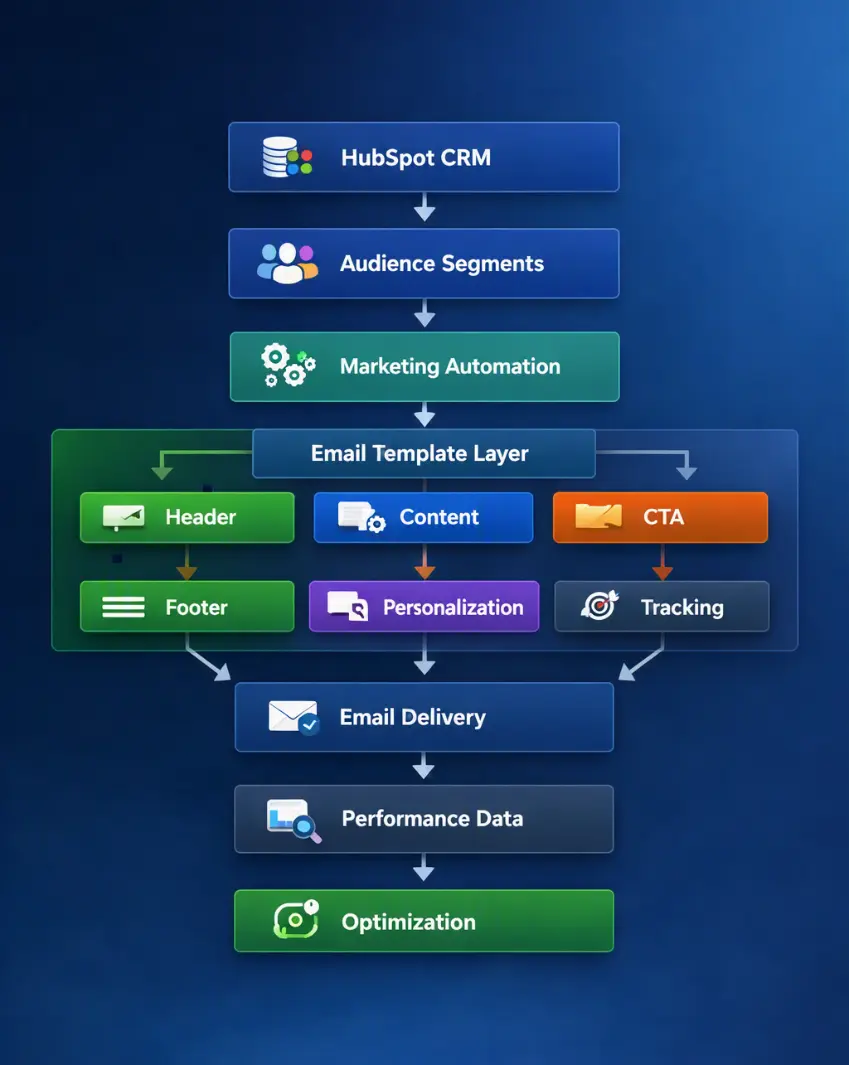
This turns email from a collection of individual assets into an enterprise communication system.
The Business Value of Reusable Email Systems
A well-designed system provides several benefits:
- Faster campaign production: Marketing teams spend less time rebuilding layouts.
- Better brand consistency: Shared components reduce visual differences between campaigns.
- Lower maintenance effort: Changes can be managed centrally where appropriate.
- Better scalability: New campaigns can be created without continuously increasing technical effort.
- Better collaboration: Marketing, design, development, and operations can work within clearly defined responsibilities.
- More reliable automation: Automated workflows can reuse proven email structures instead of generating every email independently.
BHSoft's Approach
At BHSoft, we approach HubSpot email architecture as part of the broader CRM and marketing automation system.
Our focus is not simply creating attractive emails. We look at how email connects with:
- CRM data
- Segmentation
- Lifecycle stages
- Marketing automation
- Personalization
- Forms
- Enterprise systems
- Data synchronization
- Reporting
The objective is to create an email foundation that marketing teams can operate independently while maintaining the technical consistency required by an enterprise environment.
In other words: Build the system once. Reuse it many times.
Conclusion
A scalable HubSpot email operation should not depend on creating every email from scratch.
The stronger approach is to build a reusable system: Templates + Modules + Personalization + Segmentation + Automation + Governance
The goal is not maximum flexibility. It is the right balance between consistency, flexibility, maintainability, and speed.
When the underlying email architecture is designed properly, marketing teams can focus on campaigns and customer communication rather than rebuilding the same technical structure again and again.
Looking for an Enterprise HubSpot Partner?
Whether you need to connect HubSpot with an existing CRM, improve customer data quality, build marketing automation, or create personalized customer journeys, BHSoft can help.
Our team combines HubSpot expertise, enterprise integration experience, data engineering, and custom software development to build solutions around your existing business environment. Contact BHSOFT today to discuss your project