Real-Time GPS Tracking and Field Attendance: How Businesses Can Manage Mobile Workforces More Effectively
15 minutes read
November 06, 2026
Why Field Workforce Management Needs Better Visibility
Managing employees who work outside the office is more complicated than recording when their workday begins and ends.
Sales representatives visit clients across different locations. Service technicians travel between customer sites. Delivery teams operate on changing routes, while inspection personnel collect information in the field.
For managers, maintaining visibility into these activities can be challenging.
Traditional workforce management often relies on phone calls, messaging applications, spreadsheets, or manual attendance reports.
These approaches may work for small teams, but they become harder to coordinate as organizations expand.
Common problems include inaccurate check-in information, delayed updates, limited visibility into field activities, and administrative effort spent verifying attendance records.
Real-time GPS tracking and location-based attendance systems help businesses connect workforce activities with geographic information, operational data, and digital workflows.
Rather than treating attendance as an isolated administrative task, organizations can incorporate location information into broader field workforce management.
This article explores how GPS tracking and attendance systems work, their business applications, key technologies, benefits, and implementation considerations.
What Is a Real-Time GPS Tracking System?
A real-time GPS tracking system is a location-based application that collects and processes geographic position updates from GPS-enabled devices to provide timely information about the locations of authorized users, vehicles, or assets.
In workforce management, GPS tracking can help organizations understand where field employees are during approved working activities.
A typical system includes:
- GPS-enabled smartphones or tracking devices
- Mobile applications
- Location permissions and privacy controls
- Secure communication services
- Backend data processing
- Geographic databases
- Interactive map dashboards
- Attendance and reporting functionality
The term real-time generally refers to frequently updated location information.
Actual update intervals depend on application configuration, mobile operating-system restrictions, connectivity, battery consumption, and business requirements.
Real-time tracking should also be distinguished from single-event location verification. A check-in can capture a location at one moment without continuously tracking the employee.
What Is a GPS Attendance System?
A GPS attendance system is software that records employee attendance events together with location and timestamp information to help verify where and when a check-in or check-out occurred.
Traditional attendance systems often depend on fixed office locations, physical attendance terminals, or manual timesheets.
GPS-based attendance extends this process to employees working at customer sites, construction locations, service areas, and other off-site environments.
For example, a technician arriving at a customer facility can open a mobile application and check in.
Depending on the system configuration, the application may record:
- Employee or authorized user identifier
- Check-in timestamp
- Geographic coordinates
- Related customer site or assigned job
- Device-reported location accuracy
- Check-out event
- Optional job notes or supporting information
These records can help managers review attendance and field activities through a central platform.
However, a GPS coordinate is not conclusive proof that a particular employee performed work. Location accuracy, device integrity, user identity, and business processes all affect the reliability of attendance records.
How Does Real-Time GPS Tracking and Field Attendance Work?
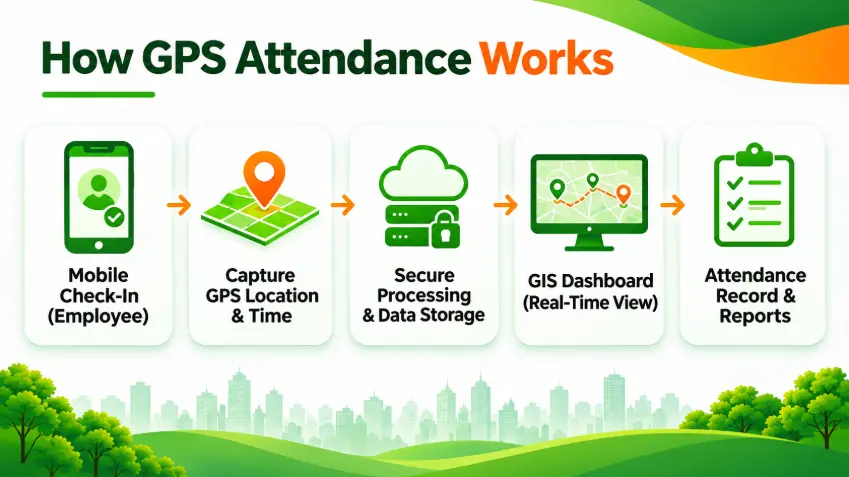
A typical system follows six stages.
1. Employee Authentication
The employee signs in to an authorized mobile application.
Authentication associates attendance and location events with the appropriate user account.
2. Location Collection
With appropriate permission, the application obtains location information from the smartphone's positioning services.
Depending on the device and environment, location estimation may use satellite positioning, Wi-Fi, cellular networks, and other signals.
3. GPS-Based Check-In or Check-Out
The employee records attendance through the application.
The system associates the event with a timestamp and the location information available at that moment.
4. Secure Data Transmission
Attendance and authorized location updates are transmitted to backend services.
If connectivity is temporarily unavailable, a suitable application may store events locally and synchronize them later.
5. Map Visualization
Managers with appropriate permissions can view relevant information through an interactive geographic dashboard.
Depending on the system design, this may include latest reported locations, assigned sites, attendance events, or historical routes.
6. Reporting and Business Integration
The application organizes information into reports and connects relevant attendance records to operational or HR systems.
This can help reduce duplicate data entry and support more consistent workflows.
Five Essential Features of a Field Employee GPS Tracking System
1. Real-Time Employee Location Tracking
For businesses with geographically distributed teams, timely location visibility can support operational coordination.
An authorized manager may use a map dashboard to review the latest reported positions of available field personnel.
Potential applications include identifying nearby technicians, coordinating customer visits, and responding to changes in scheduled field activities.
Business value:
- Better visibility into distributed operations
- More informed assignment decisions
- Reduced reliance on repeated location-checking calls
- Improved coordination between office and field teams
Tracking should be limited to legitimate business purposes and authorized work periods.
2. GPS-Verified Attendance
GPS attendance connects check-in events with time and geographic information.
This is particularly useful when employees begin work at different customer or project locations.
A typical workflow may include:
- Employee arrives at an assigned site.
- Employee opens the attendance application.
- The system requests the necessary location permission.
- Employee checks in.
- The application records the event and available location information.
- Authorized managers review the attendance record.
Some systems may also support geofencing, which compares a reported position with a predefined geographic boundary.
For example, an application could flag check-ins outside the expected work area for review.
Business value: More structured attendance records and less dependence on manually reported locations.
Organizations should provide procedures for correcting inaccurate or disputed records before using them in payroll decisions.
3. Route History and Visit Reporting
A field tracking application may record authorized location observations throughout a work period.
These observations can be used to create route histories, visit records, and operational reports.
Possible reports include:
- Completed customer visits
- Check-in and check-out history
- Recorded travel routes
- Visit duration
- Assigned versus recorded site visits
- Location event history
Route reports can help identify operational patterns and potential scheduling inefficiencies.
However, the platform should distinguish measured activity from inferred activity. A location trace alone does not establish work quality or employee productivity.
4. Mobile Attendance Application
Modern location-based attendance systems can operate on smartphones.
For suitable use cases, this removes the need to install dedicated attendance terminals at every field location.
A mobile application may provide:
- Employee login
- GPS-based check-in and check-out
- Assigned job information
- Customer visit records
- Route information
- Attendance history
- Notifications
- Offline event synchronization
A simple interface matters because field employees may need to record attendance quickly while working in challenging environments.
5. ERP and HR System Integration
A location-based attendance application becomes more useful when it integrates with the organization's existing software.
For example, attendance information may be connected to:
- HR and employee records
- Timesheet management
- Field service schedules
- Payroll review workflows
- Customer relationship management
- Work order management
- Operational reports
An integrated architecture can reduce duplicate entry and improve consistency across business processes.
The exact level of integration depends on the ERP version, available APIs, and installed modules.
GPS Attendance Integration with Odoo 20
Odoo 20 supports location-aware employee check-in and check-out through its Attendances application, with GPS coordinates available when device tracking is enabled and location data is provided.
However, advanced capabilities such as continuous employee location tracking, historical route visualization, geofencing, and specialized field workforce dashboards may require custom development or additional modules.
Businesses can extend Odoo's attendance functionality with location-based applications and GIS technology to support more comprehensive field workforce management.
How a Custom Odoo GPS Attendance Integration Could Work
A business could design a workflow in which:
- Mobile application: Employees authenticate, review assignments, and submit location-associated attendance events.
- Location service: The application obtains location information with appropriate permissions.
- Backend integration: Validated events are transmitted to the ERP environment through supported interfaces.
- Odoo attendance records: Relevant check-in and check-out information is associated with employee records.
- GIS dashboard: Authorized managers can visualize appropriate location and operational data.
- Reporting: Attendance and field activity information is made available through controlled reports.
The architecture should avoid unnecessary duplication of sensitive employee location data.
Which Businesses Benefit from GPS-Based Field Attendance?
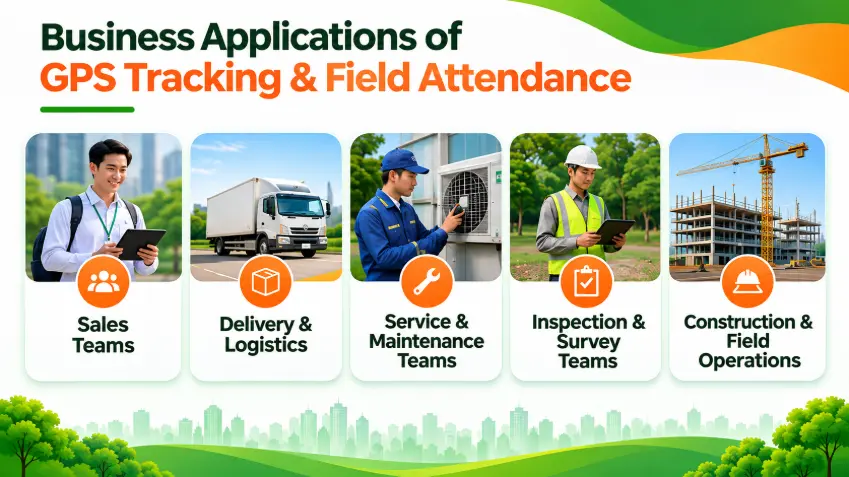
Sales and Field Marketing Teams
Sales representatives may visit multiple customer locations during a working day.
Location-based check-ins can support visit documentation and coordination.
Delivery and Logistics Companies
Delivery personnel operate across geographic routes.
A location-enabled workforce platform can support field coordination and connect selected activities with delivery workflows.
Service and Maintenance Teams
Technicians frequently work at customer sites.
GPS attendance can associate check-ins with scheduled service locations and work orders.
Inspection and Survey Teams
Inspectors and survey personnel often visit geographically distributed facilities or project areas.
Location-associated event records can support visit documentation and administrative review.
Construction and Infrastructure Operations
Companies managing multiple sites may use mobile attendance tools to support workforce records across different project locations.
What Are the Business Benefits of GPS Attendance and Tracking?
Better Operational Visibility
Managers can review appropriate field activities without relying exclusively on phone calls or manual status updates.
More Consistent Attendance Records
Digital attendance events provide a more structured record of check-in and check-out times and available locations.
Reduced Administrative Work
Automated data capture and system integration can reduce repetitive manual reporting.
More Informed Workforce Planning
Geographic information can support assignment decisions, coverage planning, and analysis of field operation patterns.
Improved System Connectivity
When field records integrate with enterprise applications, organizations can manage relevant information through more coordinated workflows.
These benefits should be evaluated against measurable operational indicators rather than assumed.
GPS Tracking vs. GPS Attendance: What's the Difference?
| Feature | GPS Attendance | GPS Tracking |
|---|---|---|
| Main purpose | Record attendance events | Monitor location changes |
| Data collection | Usually at check-in/out | Periodic or event-based updates |
| Geographic information | Location at attendance event | Location observations over time |
| Common use case | Field attendance verification | Field coordination and route visibility |
| Privacy impact | Typically narrower | May involve more sensitive data |
| Connectivity needs | Can support delayed synchronization | Frequent updates often need connectivity |
Organizations should implement only the level of location collection necessary for the intended business purpose.
Continuous tracking is not always necessary for reliable attendance management.
What Technologies Are Used to Build a GPS Tracking System?
A custom system may use the following architecture.
| Component | Technology Options |
|---|---|
| Mobile application | Flutter, React Native, Swift, Kotlin |
| Location services | Android and iOS location APIs |
| Map visualization | Google Maps, Mapbox, OpenLayers, Leaflet |
| Backend | .NET, Java, Node.js, Python |
| Database | PostgreSQL with PostGIS |
| Real-time communication | WebSockets, MQTT, HTTPS |
| ERP integration | Supported Odoo APIs and custom integration services |
| Security | Authentication, authorization, encryption, audit logging |
For geographic queries, PostGIS can help answer questions such as whether an attendance event occurred within a configured site boundary.
Developers should also consider GPS accuracy, time synchronization, offline operation, battery use, and operating-system restrictions.
Privacy and Security Considerations
Employee location data can be sensitive.
Organizations should design GPS tracking systems with privacy and proportionality in mind.
Key safeguards include:
- Purpose limitation: Collect location information only for defined and legitimate operational purposes.
- Clear notice: Explain what data is collected, when collection occurs, and how it will be used.
- Work-hour boundaries: Avoid collecting employee locations outside authorized work activities unless there is a separate lawful justification.
- Role-based permissions: Restrict access to employees and managers who genuinely need the information.
- Retention limits: Store identifiable location data only as long as necessary.
- Secure transmission: Protect data in transit and at rest.
- Data correction: Establish procedures for reviewing inaccurate attendance records.
- Mobile platform compliance: Respect Android and iOS location permission requirements.
For Android applications, background location access is subject to additional platform and Google Play requirements. Businesses should prefer less intrusive collection methods when those methods meet the operational need.
How to Implement a Field GPS Tracking System
Step 1: Define the Operational Problem
Determine whether the main objective is attendance verification, route visibility, visit reporting, or field coordination.
Step 2: Establish Privacy and Workforce Policies
Define authorized purposes, tracking periods, employee notices, permissions, retention, and dispute-resolution procedures.
Step 3: Evaluate Existing Business Software
Review HR, ERP, CRM, field service, and payroll systems to identify integration requirements.
Step 4: Choose the Appropriate Tracking Model
Decide whether the application needs attendance-event location, periodic updates, geofencing, or continuous tracking.
Avoid collecting more information than necessary.
Step 5: Design Mobile and Backend Architecture
Select mapping technology, location services, authentication methods, data storage, and integration interfaces.
Step 6: Develop a Pilot
Test the system with a limited group of authorized users and representative field conditions.
Step 7: Validate Performance
Assess location accuracy, attendance event reliability, battery impact, offline behavior, privacy controls, and reporting accuracy.
Step 8: Expand Based on Results
Scale the platform when its operational benefits and compliance requirements have been validated.
Frequently Asked Questions
What is a real-time GPS tracking system?
A real-time GPS tracking system collects location updates from authorized GPS-enabled devices and makes the information available through software applications or dashboards.
How does GPS attendance work?
GPS attendance records an employee's check-in or check-out together with geographic and time information, subject to location permissions and system configuration.
Can GPS attendance work without internet access?
Some mobile applications can store attendance events locally and synchronize them later. This requires explicit offline functionality.
Does GPS attendance require separate tracking hardware?
Not always. GPS-enabled smartphones can provide location information for suitable attendance applications.
Can a GPS tracking system integrate with Odoo?
Yes. Odoo supports certain geolocation-enabled attendance workflows, while advanced tracking and route history may require additional modules or custom development.
Can GPS tracking reduce false attendance records?
Location-associated records can help identify inconsistencies, but GPS alone cannot guarantee employee identity or prove that work was completed.
Is employee GPS tracking legal?
Requirements vary by jurisdiction and employment context. Organizations should assess applicable privacy, labor, and data-protection rules before deployment.
What is the difference between GPS tracking and geofencing?
GPS tracking collects location observations. Geofencing compares location information with a predefined geographic boundary and may trigger events when configured conditions are met.
Conclusion: From Attendance Records to Connected Field Operations
Managing a field workforce requires more than knowing when employees start and finish work.
Businesses also need reliable records, appropriate operational visibility, and efficient coordination between office teams and employees working at different locations.
Real-time GPS tracking and location-based attendance can help organizations connect these processes through mobile applications, GIS visualization, and enterprise software integration.
However, successful implementation depends on selecting the right tracking approach, protecting employee privacy, and ensuring location information supports legitimate business decisions.
The strongest solutions balance operational visibility with security, usability, and employee trust.
Explore Location-Based Software Development with BHSoft
Building an effective workforce tracking or GPS attendance application requires expertise in mobile software, location services, backend systems, GIS, and enterprise integration.
At BHSoft, we understand the importance of designing software around practical operational requirements.
Whether your business is considering a custom location-based application, a GIS-powered management dashboard, or integration with existing enterprise systems, our team can discuss the technical requirements and development options.
Looking to improve field operations with location-enabled software?
Talk to our team to discuss your application development needs and explore an architecture aligned with your business goals.