Odoo 20: What’s New and What It Means for Businesses
10 minutes read
October 08, 2026
Odoo 20 was officially released in September 2026, bringing a broad set of improvements across AI, accounting, payroll, CRM, inventory, websites, eCommerce, appointments, and core user experience.
The biggest shift is clear:
Odoo is moving from AI that helps users to AI that can actively perform work.
But Odoo 20 is not only about AI. It also introduces practical improvements across daily business operations, from website building and payments to warehouse processes and employee management.
This article looks at the most important changes in Odoo 20 and what they could mean for businesses considering an upgrade.
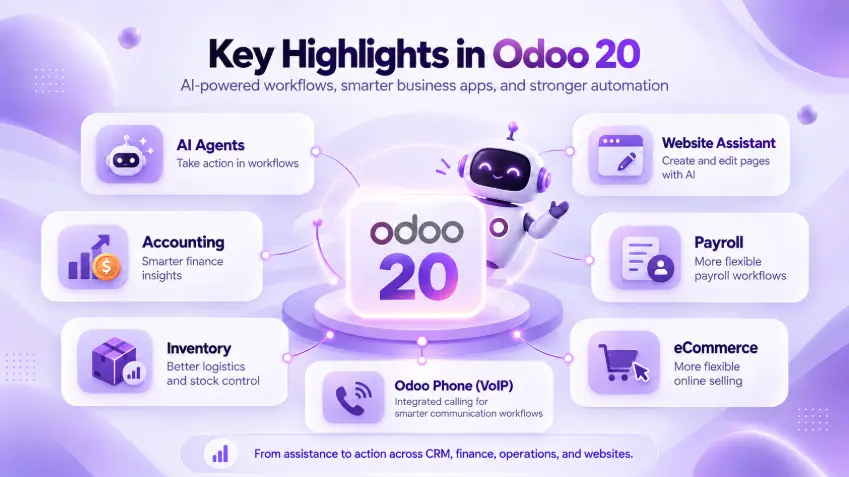
1. AI Agents Can Now Do More Than Answer Questions
AI is one of the headline features of Odoo 20.
In previous versions, AI was increasingly used to assist users with content, search, and information retrieval. In Odoo 20, the direction moves further toward AI agents that can take action inside business workflows.
According to Odoo, users can describe an automation in natural language, and an AI agent can help turn that instruction into an operational process. Examples include confirming a sales order when a matching email arrives, assigning leads, creating projects after contracts are signed, or notifying teams when inventory becomes low.
AI agents can also create and update records, interact with files, and connect to external systems through technologies such as Model Context Protocol, or MCP.
For businesses, this means AI is becoming less of a separate chatbot and more of a layer embedded directly into business operations. The value is not simply faster answers. It is the possibility of reducing repetitive manual work while keeping AI connected to existing business processes.
2. A Much More Capable AI Website Assistant
Website creation is another area where Odoo 20 puts AI at the center.
The new AI Website Assistant can help users create entire webpages, modify existing blocks, generate or retrieve images, edit forms, restructure menus, and even use an external website as inspiration for a new page.
Users can ask the assistant to add interactive elements such as:
- counters
- tabs
- toggles
- animations
- forms
- menus
- website sections
The assistant can also use records already stored in the Odoo database, such as products or events, when generating content.
One particularly interesting capability is the option to provide a URL and ask the AI assistant to recreate a similar page structure within the Odoo website.
This could significantly reduce the time required to create landing pages, campaign pages, product pages, and other business content.
However, businesses should still treat AI-generated websites as a starting point rather than a completely autonomous design process.
Brand consistency, accessibility, SEO, conversion flows, and custom integrations still require proper review.
3. Website and SEO Improvements
Beyond AI, Odoo 20 introduces a large number of improvements to Website.
The website editor itself has received UI and UX improvements, while additional building blocks and styling options make page creation more flexible.
Some notable additions include:
- mobile previews for individual website blocks
- animated number blocks
- improved mega menus
- QR codes generated from tracking links
- module-specific website search
- vertical video support
- improved website forms
- WhatsApp contact widgets
- improved multilingual URLs
- structured data added automatically to webpages
- better sitemap generation
SEO also receives several improvements. Odoo 20 introduces adaptive image sizing using srcset, better handling of paginated pages to reduce duplicate content, and AI-assisted SEO optimization. Structured data is now added to webpages by default to support richer search-engine results.
Another interesting addition is support for an llms.txt file, intended to help large language models better understand website content.
This reflects a broader shift in website optimization: businesses increasingly need to think not only about how search engines understand content, but also how AI systems consume it.
4. eCommerce Becomes More Flexible
Odoo 20 also continues to improve the eCommerce experience.
Some practical additions include:
- customer-initiated returns through the portal
- stock-based automatic product publishing and unpublishing
- new product-grid layouts
- product variant thumbnails
- additional product filters
- tax-inclusive or tax-exclusive pricing at pricelist level
- simplified inventory management for eCommerce
The simplified inventory option is especially interesting for smaller businesses. An online store can now use a simple on-hand quantity without requiring the full Inventory application and warehouse transfer workflow. This lowers the operational complexity for businesses that need basic stock control without a full warehouse-management implementation.
At the same time, more complex businesses can continue using the deeper Inventory functionality. That reinforces one of Odoo's key strengths: organizations can start with relatively simple workflows and add complexity as their operations grow.
5. Accounting Gets Its Own AI Assistant
Odoo 20 also introduces an AI-oriented approach to accounting.
The Accounting Assistant can answer questions based on financial reports, such as receivables or cash-flow information. It can also assist with identifying reconciliation issues and provide recommendations based on the accounting data.
Payment workflows have also been improved.
According to Odoo, users can pay bills directly from the system individually or in bulk, reducing the need to move between Odoo, banking portals, and payment files.
For finance teams, the significance is similar to what we see elsewhere in Odoo 20: the system is gradually moving from recording business activity toward actively assisting with operational decisions and actions.
6. Payroll Becomes More Flexible
Payroll also receives several workflow improvements.
Odoo 20 introduces a redesigned dashboard that surfaces configuration warnings earlier.
Teams can test payroll runs and print payslips before validation. Working schedules can be defined using hours per day instead of only fixed start and end times. Users can also work backwards from a target net salary to estimate the total employment cost.
Expenses can now feed into payroll, and salary simulations can be performed directly from an employee profile.
These changes are less visible than AI agents, but they can have a significant impact on day-to-day HR and payroll operations.
7. Inventory and Logistics Continue to Evolve
Odoo 20 also brings new capabilities to inventory management.
At Odoo Experience 2026, Odoo highlighted features including:
- ministock management
- redesigned labels
- integrated CMR documents
- improved allocation reports
- enhanced intercompany and interbranch flows Odoo
Package handling has also been improved. Packages and their contents can be pre-encoded by suppliers, allowing warehouse users to scan a package and receive its contents more efficiently.
For organizations operating warehouses, distribution networks, or multiple business entities, these improvements can reduce manual steps and improve traceability.
8. Appointments and Booking Get More Control
Odoo 20 expands the Appointments application with more operational controls.
Businesses can set capacity limits per time slot, manually override capacity where needed, manage closure days more easily, and request customer feedback after appointments.
The booking experience has also been redesigned to align more closely with the rest of Odoo's website experience. Performance optimizations have been introduced for availability calculations, which can be particularly important for businesses managing many resources or appointment types.
9. Everyday UX Improvements Matter Too
Not every useful improvement in Odoo 20 is a major new feature.
The release also includes numerous quality-of-life improvements across the platform.
Examples include:
- better activity scheduling
- assignment of activities to individuals or roles
- clearer meeting activities
- drag-and-drop unscheduling in calendar views
- CC recipients when sending emails
- better Chatter filtering
- improved mobile login
- support for both commas and periods as decimal separators regardless of user localization Odoo
These changes may sound small individually. But in an ERP platform used throughout the working day, reducing friction in common interactions can have a meaningful cumulative impact.
10. Odoo Phone Brings Calling Deeper Into Business Workflows
Odoo 20 continues to strengthen its built-in business communication capabilities through Odoo Phone.
The Phone app allows teams to make and receive internet-based calls directly inside Odoo while staying connected to applications such as CRM and Helpdesk. The Phone widget remains available while users move between Odoo apps, allowing them to handle calls, check customer information, send emails, and schedule follow-up activities without leaving their workflow.
For sales and support teams, this creates a much tighter connection between conversations and business data. Instead of: Phone call → Take notes separately → Update CRM later
the workflow can become:
Incoming call → Customer record → Conversation → Follow-up activity → CRM / Helpdesk update
all within the same environment.
Call Recording and Transcription
One of the more useful capabilities is integrated call recording and transcription.
Calls can be recorded through supported providers, and recordings can then be transcribed into text. Odoo’s Call Debrief interface synchronizes the audio recording with the transcript, allowing users to jump directly to different points in the conversation.
This can be valuable for:
- sales-call reviews
- customer-support quality assurance
- follow-up preparation
- training
- capturing customer requirements
- reducing manual note-taking
Call Routing and Queues
Odoo Phone also supports more structured telephony workflows.
Businesses can configure PBX functionality and visual call flows to route incoming calls to users, teams, call queues, menus, voicemail, or external numbers.
Odoo also highlights capabilities such as call queues, forwarding, simultaneous ringing, conference calls, and dynamic caller IDs depending on the connected provider.
This makes Odoo Phone relevant not only for individual sales representatives but also for organizations operating customer-service or support teams.
Integrated VoIP Providers
Odoo 20 supports verified providers including Axivox, DIDWW, and OnSIP, while other SIP providers may also work if they support WebSocket-based SIP connectivity and WebRTC.
That means businesses can potentially integrate Odoo into an existing telecommunications setup rather than maintaining a completely separate calling system.
The Bigger Direction Behind Odoo 20
The most interesting part of Odoo 20 is not any single feature. It is the direction of the platform.
Odoo is increasingly combining three layers:
- Business applications
- Business data and workflows
- AI agents capable of understanding and acting on both
Historically, ERP systems primarily stored information and enforced workflows.
Odoo 20 moves closer toward a model where the ERP can also actively participate in those workflows.
Instead of: User → Odoo screen → Manual action
the workflow can increasingly become:
Business event → Odoo → AI Agent → Data / Rules → Action → Human oversight
That shift could change how organizations design ERP processes.
What Should Businesses Consider Before Upgrading?
New features alone should not determine whether a company upgrades immediately.
An Odoo implementation often includes custom modules, third-party applications, integrations, modified workflows, reports, and infrastructure.
Before upgrading to Odoo 20, businesses should evaluate:
1. Current custom modules
Check compatibility with Odoo 20 and identify APIs or framework behavior that has changed.
2. Third-party applications
Confirm that required apps are available and supported for version 20.
3. Integrations
Test ERP connections with CRM systems, eCommerce platforms, payment systems, logistics systems, BI tools, and other external applications.
4. Business-critical workflows
Revalidate Sales, Purchase, Accounting, Manufacturing, Inventory, HR, and other operational processes.
5. AI governance
Determine which actions AI agents should be allowed to perform automatically and which should require human approval.
6. Data and permissions
Ensure AI features respect existing access rights, business rules, and sensitive-data controls.
7. Staging and regression testing
Odoo itself recommends testing changes in duplicated or staging databases before modifying production environments.
An upgrade should therefore be treated as an engineering project, not only a software update.
Odoo 20 and the Future of ERP
Odoo 20 shows how ERP platforms are changing.
The traditional ERP model was primarily about centralizing information:
CRM + Sales + Finance + Inventory + HR + Operations
The next stage adds another layer: AI that understands those systems and helps operate them. Odoo 20 is an important step in that direction. Its AI agents, website-generation capabilities, accounting assistance, improved operational workflows, and broader usability enhancements suggest that ERP systems are becoming increasingly proactive.
For businesses, the question is no longer simply: Which processes can we manage in our ERP?
It is increasingly: Which processes can the ERP help us execute, automate, and improve?
Is Odoo 20 Right for Your Business?
The answer depends on your existing Odoo environment, customizations, integrations, and business priorities.
For a new implementation, Odoo 20 provides a broader set of tools for automation, AI-assisted workflows, websites, eCommerce, finance, inventory, and employee management.
For existing Odoo users, the value of upgrading depends on whether the new capabilities justify the migration effort and whether existing custom development can be moved safely.
At BHSoft, we work with businesses on Odoo implementation, customization, integration, migration, and software development around complex business workflows.
Whether you are considering a new Odoo implementation or evaluating an upgrade to Odoo 20, the most important step is understanding how the technology fits your actual business processes.
Planning an Odoo 20 implementation or upgrade? Talk to our team about the right technical approach for your business.