When Microsoft 365 Went Down on a Critical Meeting Day: How BHSoft Supported Its Client
10 minutes read
November 17, 2026
Thousands of B2B meetings scheduled. A major global Microsoft outage. And one of the most biggest meeting days of the year.
Last Friday was supposed to be one of our client's busiest days of the year, with thousands of B2B meetings scheduled back to back as part of its club meeting event.
But the night before, Microsoft 365 began experiencing serious service disruptions.
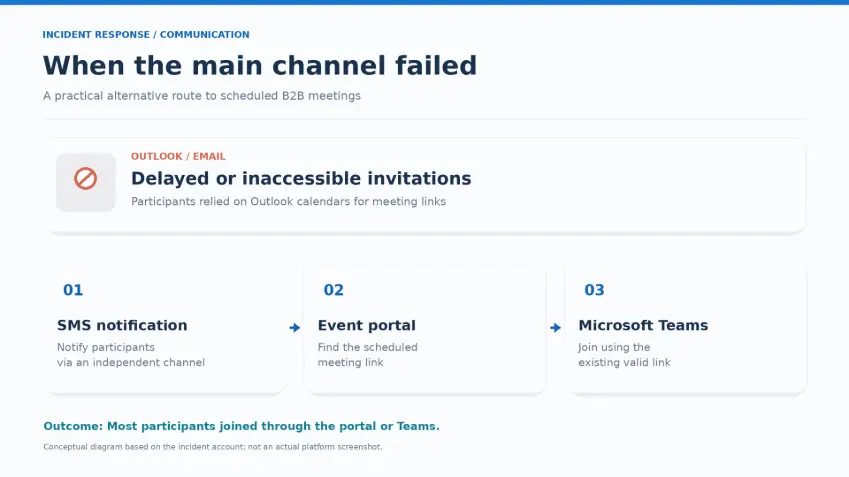
Outlook emails were delayed or inaccessible. Microsoft Teams remained mostly operational but was unstable for some users. Meanwhile, nearly every participant relied on their Outlook calendar to access meeting invitations.
For an event built around scheduled business meetings, the timing couldn't have been worse.
The challenge was clear: How could our client keep thousands of business meetings running when the communication channel participants relied on was no longer dependable?
Here is how BHSoft supported its client in responding to the disruption, addressing unexpected challenges, and keeping the event moving.
The Challenge: When the Platform Works, but Users Can't Access Their Meetings
The Microsoft 365 disruption created an immediate challenge for meeting participants.
Although Microsoft Teams was still largely operational, Outlook issues meant that many users could have difficulty accessing the calendar invitations containing their meeting links.
Several potential problems needed to be addressed:
- Participants might not be able to retrieve their meeting links from Outlook.
- Email notifications could be delayed or fail to reach recipients in time.
- Some participants could experience unstable Microsoft Teams connections.
- Meeting updates and cancellations could be affected by disruptions to Microsoft services.
With thousands of meetings scheduled throughout the day, waiting for Microsoft to restore normal services was not a practical solution.
The response needed to focus on what was still working and how participants could continue accessing their meetings.
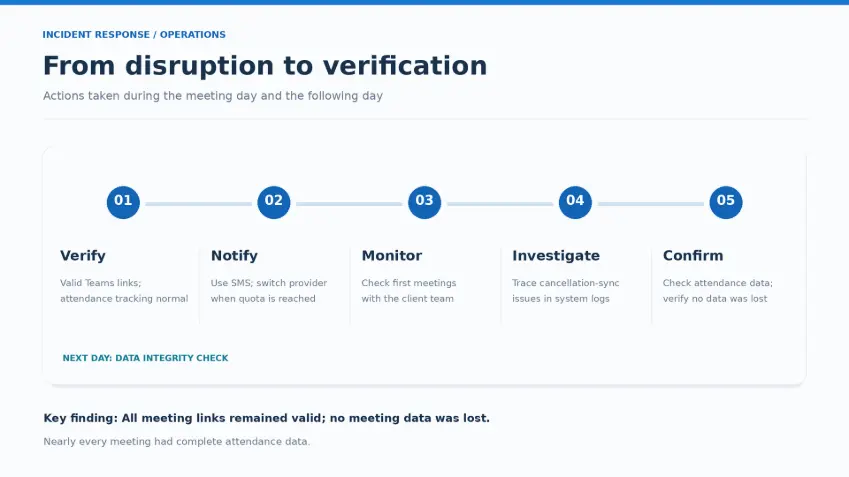
Step 1: Check the Platform Before Taking Action
The first priority was to determine whether the client's own platform was affected.
Initial checks confirmed that every booked meeting had a valid Microsoft Teams link and that attendance tracking was functioning normally.
This finding helped narrow down the problem.
The platform itself was healthy. The immediate issue was how participants accessed their scheduled meetings.
Rather than troubleshooting a system that was already working, the response could focus on helping participants reach their meeting links through an alternative route.
Step 2: Find an Alternative to Email
Email would normally be the most obvious way to contact participants about a change to their meeting arrangements.
However, in this situation, it was also part of the problem.
Sending an email explaining that Outlook was down would accomplish little if recipients couldn't access their inboxes.
An alternative communication channel was needed, one that didn't rely on the affected Microsoft services.
The solution was SMS.
Within minutes, the list of participants with meetings scheduled that day was exported, and a short notification was prepared.
The message informed participants about the Outlook disruption and directed them to access their meetings through the platform's portal, where their meeting links remained available.
This offered participants another way to join their scheduled meetings without relying on Outlook calendar invitations.
But even the fallback solution encountered an unexpected obstacle.
Partway through the SMS distribution, the initial provider's sending quota was exhausted.
To continue reaching participants, the remaining messages were moved to another SMS provider.
The situation highlighted an important lesson: an alternative communication channel must be ready not only technically, but also operationally.
Step 3: Monitor the First Meetings and Coordinate With the Client
As the first meetings began, the response team checked with the client's team to understand how participants were managing.
The initial feedback was encouraging.
Most participants were able to join their meetings normally through the platform portal or Microsoft Teams.
Although the SMS notifications did not reach everyone, the alternative communication approach helped many participants avoid missing their scheduled meetings.
This was particularly important given the scale of the event and the limited time available to respond.
The focus then shifted to monitoring additional issues that might emerge as the event progressed.
Step 4: Address Secondary Disruptions
The initial Outlook access problem was not the only challenge.
In the afternoon, another issue emerged: meeting cancellations were no longer synchronizing with Outlook because the Microsoft API supporting that feature was also affected.
This meant that even though the platform's core meeting functions remained operational, certain workflows relying on Microsoft services were disrupted.
Individual cases were investigated through system logs to understand what was happening.
The client was kept informed about which functions were working, which were affected, and why.
Together, the teams agreed to pause email-dependent workflows until Microsoft services recovered.
This helped avoid additional complications while the external disruption remained unresolved.
The experience reinforced an important point: third-party outages can affect more than the most visible service. They can also disrupt integrations and connected workflows.
Step 5: Verify Data Integrity After the Incident
The response did not end when the meeting day was over.
The following day, checks were carried out to verify the completeness and integrity of the meeting data.
The results confirmed that:
- All meeting links remained valid.
- Nearly every meeting had complete attendance data.
- No meeting data was lost.
These findings provided important reassurance that the disruption had not compromised the recorded meeting information.
While not every participant could be reached through SMS, the response helped maintain access to scheduled meetings and supported the event's continuity.
Five Lessons Learned From the Microsoft 365 Disruption
This incident offered several practical lessons for organizations that rely on third-party platforms and services.
1. Understand your system dependencies
Knowing which features depend on external services helps teams identify what will be affected when a third-party system becomes unavailable.
A healthy platform doesn't necessarily mean users can access every function they need.
2. Plan alternative communication channels
When a primary communication channel fails, relying on that same channel to explain the problem is ineffective.
Organizations should prepare independent ways to reach users during disruptions.
3. Test fallback solutions before they're needed
Having a backup is not enough.
The SMS quota limitation demonstrated why alternative providers, capacity limits, and operational readiness should be considered in advance.
4. Design for third-party service failures
External API disruptions can affect synchronization and other connected workflows.
Mechanisms such as retries, queues, and clear failure statuses can help systems handle these situations more effectively.
5. Communicate clearly and verify the results
During an incident, it is important to distinguish between what works, what doesn't, and what actions are being taken.
Afterward, data verification helps confirm the actual impact and identify any remaining issues.
Business Continuity Is About More Than Technology
Unexpected service disruptions are an unavoidable part of today's connected digital environment.
Even when an organization's own platform is operating normally, failures in external services can affect the way users access information, communicate, and complete important activities.
This incident demonstrated the value of responding quickly, identifying the real issue, finding alternative solutions, and maintaining close communication throughout the disruption.
For BHSoft, supporting clients means helping them navigate unexpected technical challenges and find practical ways forward.
During this Microsoft 365 disruption, those efforts helped the client maintain access to its scheduled meetings on one of its most important event days.
Because when unexpected technology disruptions happen, having a responsive technology partner can make a meaningful difference.
Looking for a reliable technology partner?
BHSoft provides custom software development, system integration, and ongoing technical support to help businesses manage complex technology challenges and maintain operational continuity.
Connect with the BHSoft team to discuss how we can support your business.