AI Integration for Enterprise Software: Connecting AI with Existing Systems
10 minutes read
September 30, 2026
Most enterprises do not need another isolated AI application.
They need AI to work with the systems they already use:
- Customer information may already live in a CRM.
- Orders may be managed through an ERP.
- Documents may sit in a knowledge platform.
- Operations may depend on internal applications, databases, APIs, and workflow systems built over many years.
The challenge is therefore not simply: How do we add AI?
It is: How do we connect AI to the systems, data, and workflows that already run the business?
This is where AI Engineering becomes particularly important. AI needs to become part of the enterprise software architecture without compromising security, data consistency, business rules, or operational reliability.
AI Does Not Replace the Enterprise Stack
An enterprise environment might look like:
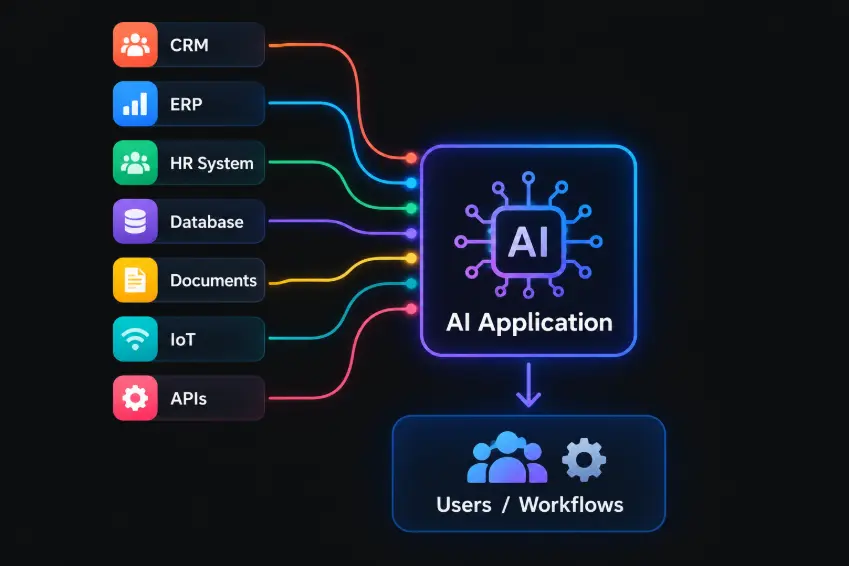
The AI layer does not necessarily replace these systems. Instead, it can provide a new way to interact with them.
A sales employee might ask: Which customers have open opportunities but have not been contacted recently? The answer may require information from the CRM, sales activities, customer history, and perhaps external data.
The AI model itself does not own that information. The engineering system needs to retrieve it, apply permissions, provide the relevant context to the model, and return a useful result.
1. Start with Systems and Workflows
AI integration should begin with understanding the existing environment.
Before building an AI feature, the engineering team should map:
- Core business systems
- Data sources
- APIs
- Databases
- Authentication mechanisms
- Existing workflows
- User roles
- Business rules
- Data ownership
This helps answer an important question: Where should AI sit within the existing architecture?
For some use cases, AI may sit on top of an existing application. For others, it may become part of a workflow engine.
In more complex environments, an AI orchestration layer may connect several enterprise systems. The right architecture depends on the business process.
2. Give AI Access Through Controlled Interfaces
One of the biggest mistakes in enterprise AI is giving a model unrestricted access to internal systems.
Instead, AI should interact with enterprise applications through controlled tools and APIs.
For example: User→ AI Application→ Intent Understanding→ Permission Check→ Tool Selection→ CRM API→ Business Data → AI Response
The model decides what information or action may be needed. The application decides whether that action is allowed.
This distinction is critical. AI should not bypass the security and business rules already implemented in enterprise applications.
3. Connect AI to Enterprise Data
AI applications commonly need two types of information.
| Structured data | Unstructured data |
|---|---|
This information typically comes from databases or APIs. Examples include:
| This information often requires retrieval mechanisms such as semantic search and RAG. Examples include:
|
The AI application may therefore combine both:
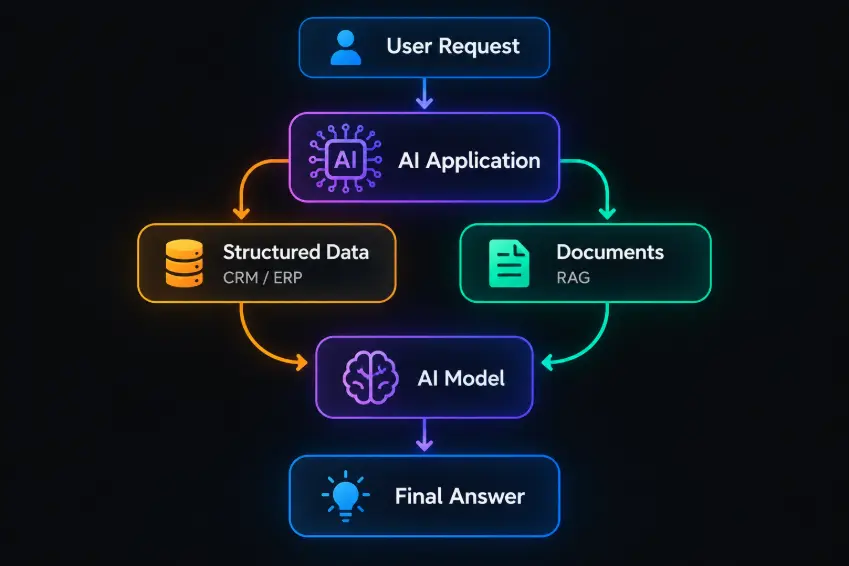
This is one reason enterprise AI often requires more than simply connecting an LLM API. The challenge is connecting different types of enterprise information into a coherent workflow.
4. Preserve Business Rules
Enterprise applications contain years of business knowledge. Some rules are implemented in software. Others exist in workflows, permissions, approval processes, or organizational practices.
AI should not silently replace these rules.
Consider an expense approval process. An employee might ask: Can you approve this expense?
The AI could analyze the request, check the relevant information, and determine whether it appears to satisfy the policy.
But whether the expense can actually be approved may still depend on:
- Employee permissions
- Approval limits
- Department rules
- Budget availability
- Existing approval workflows
The AI can assist the process without becoming the sole authority. This is a central principle of enterprise AI integration: AI should work with business rules, not work around them.
5. Integrate AI into Existing Workflows
The most useful AI features often appear inside workflows that employees already use.
Instead of forcing users to open a separate AI application, AI can become part of:
- CRM workflows
- Customer support
- Document processing
- Sales operations
- Internal knowledge management
- Software development
- HR processes
- Reporting
- Operations
For example:
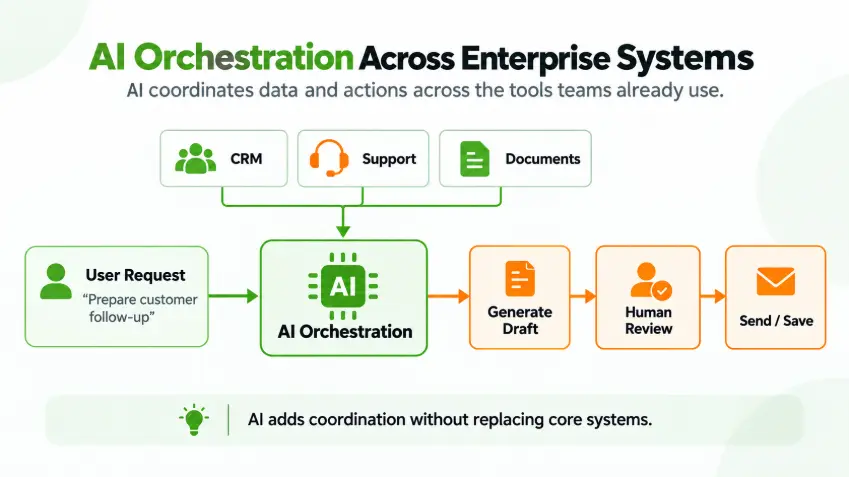
The user does not need to think about the underlying AI architecture. AI simply becomes another capability inside the business process.
6. Security and Permissions Must Follow the User
Enterprise AI introduces an important security question: Does the AI have access to everything the system can access?
The answer should generally be no. AI access should be constrained by the user's permissions and the application's security model.
For example:
- A sales employee may be able to access their own customers.
- A manager may be able to access the entire team's pipeline.
- A finance employee may have access to financial information that sales users cannot see.
If the AI ignores those boundaries, it can create a new security vulnerability even if the underlying enterprise systems are secure.
A well-designed AI integration therefore needs:
- Identity management
- Role-based access
- API authorization
- Data filtering
- Audit logging
- Tool-level permissions
- Secure handling of sensitive information
AI should inherit the organization's security principles rather than creating a parallel permission system.
7. Avoid Creating a New Data Silo
Ironically, an AI initiative can create exactly the problem it was supposed to solve.
If an organization creates a separate AI database containing copied customer information, documents, and operational data, that information can quickly become outdated. Instead, AI architecture should carefully distinguish between source systems and AI-specific representations of data.
For example, a vector index may contain embeddings of enterprise documents. That does not make the vector database the authoritative source. The original document management system remains the source of truth.
Similarly, customer information retrieved from a CRM should generally remain owned by the CRM.
This separation makes data governance much easier.
8. Use AI as an Orchestration Layer
As AI applications become more capable, they can coordinate several enterprise systems.
For example:
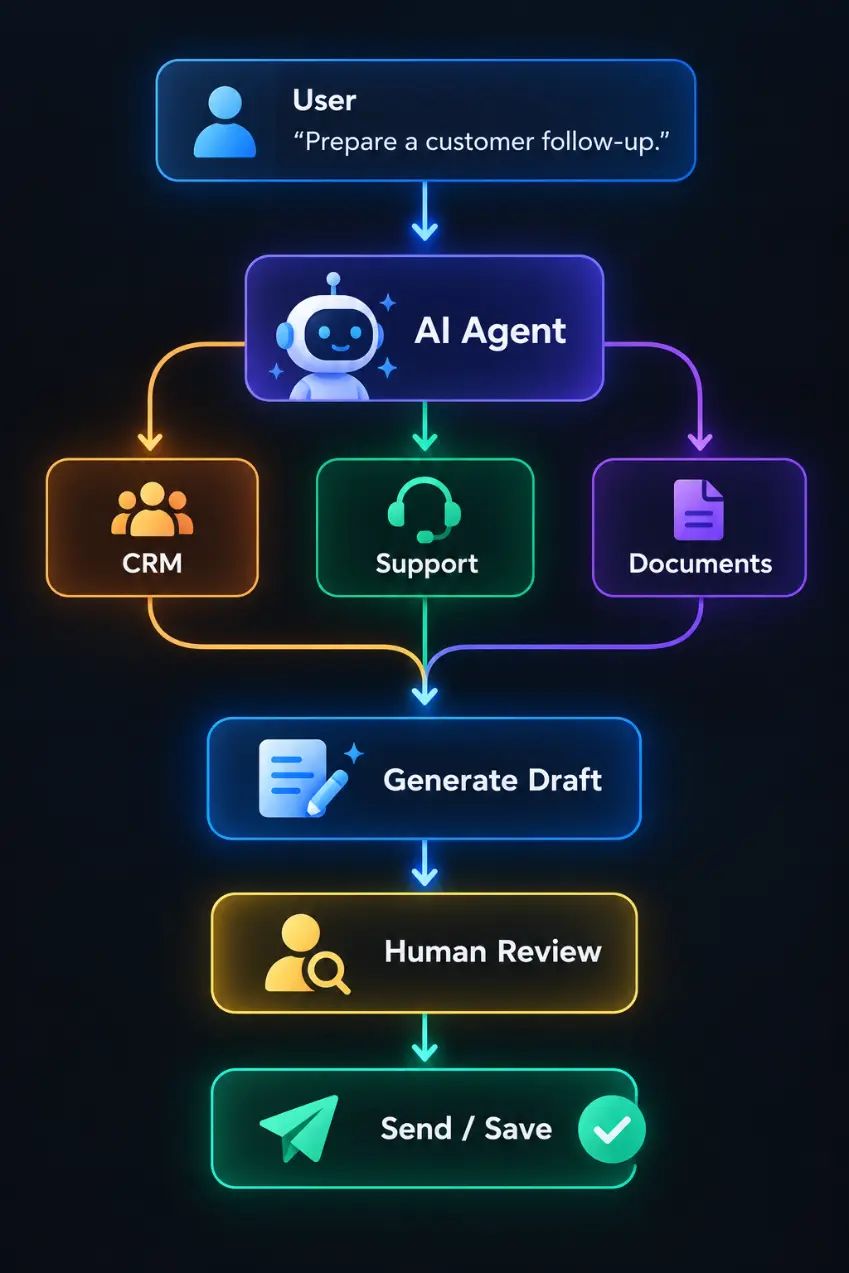
The AI is not replacing the CRM, support platform, or document system. It is orchestrating information and actions across them.
This is one of the areas where AI can provide significant value: reducing the amount of manual coordination required between systems.
9. APIs Still Matter
AI does not make traditional software engineering obsolete. In fact, enterprise AI can make good APIs even more important.
AI applications need reliable ways to:
- Read data
- Create records
- Update records
- Trigger workflows
- Search information
- Validate actions
- Execute business processes
A well-designed API becomes an interface through which AI can safely interact with the business.
Poor APIs, unclear ownership, inconsistent data models, and tightly coupled systems make AI integration significantly harder.
This is why enterprise AI projects often reveal weaknesses in existing software architecture. AI becomes another reason to invest in clean interfaces, reliable data, and modular systems.
10. Design for Human Oversight
Not every action should be autonomous.
For low-risk activities, AI may be able to execute a workflow automatically. For higher-risk activities, the system may require approval.
A useful model is: AI Understands→ AI Recommends→ Business Rules→ Human Approval→ System Executes
The appropriate level of autonomy depends on the business process. The important point is that autonomy should be designed, not assumed.
Enterprise AI Integration Is an Engineering Problem
Connecting an LLM to an API is relatively straightforward. Building a reliable AI layer across an enterprise environment is not.
The engineering challenge includes:
- Architecture: How does AI fit into the existing system?
- Data: Where does the required information come from?
- Integration: How does AI interact with enterprise applications?
- Security: What can each user and AI workflow access?
- Business logic: Which decisions remain governed by deterministic rules?
- Reliability: What happens when an AI service or integration fails?
- Observability: How do we understand what the AI did?
- Governance: How do we control changes, access, and usage over time?
These are software engineering questions as much as AI questions. This Is where AI engineering becomes different.
There is a significant difference between building an AI demo and integrating AI into enterprise software.
- A demo may look like: User → Prompt → LLM → Answer
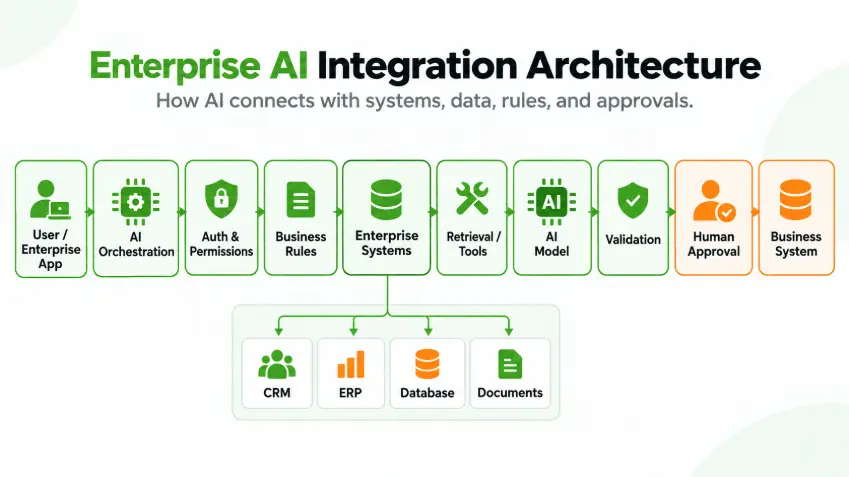
- A production enterprise application may look more like: User → Enterprise Application → AI Orchestration → Authentication / Authorization → Business Rules → CRM / ERP / Database / Documents → Retrieval / Tools → AI Model → Validation → Human Approval → Business System
The model is only one component. The value comes from how the entire system works together.
This is the core of AI Engineering.
How BHSoft Approaches Enterprise AI
At BHSoft, our view of AI engineering is rooted in our broader software engineering experience.
We work with enterprise applications where data, integrations, security, scalability, and business workflows matter. That means our AI approach is not simply about adding an AI chatbot to an existing application.
We look at the complete system:
- What does the business need?
- What systems already exist?
- Where does the data live?
- Which processes should AI improve?
- Which decisions should remain deterministic?
- Where does human oversight belong?
- How should the AI capability fit into the existing architecture?
This approach allows AI to become part of the software ecosystem rather than another disconnected tool.
From AI Feature to AI-Powered Enterprise Software
The long-term opportunity for enterprise AI is not necessarily a separate AI application. It is the ability to make existing software more intelligent:
- CRM systems can help sales teams understand customer activity.
- ERP systems can assist with operational analysis.
- Document systems can make organizational knowledge easier to access.
- Support platforms can summarize and classify customer requests.
- Internal applications can automate repetitive workflows.
- And AI agents can increasingly coordinate actions across multiple systems.
But none of this works reliably without good engineering underneath.
Final Thoughts
Enterprise AI is not about replacing the systems businesses already depend on. It is about connecting intelligence to those systems in a controlled and useful way.
The strongest AI applications are often not the ones that exist separately from the enterprise.
They are the ones that fit naturally into existing workflows, use trusted business data, respect existing permissions, follow business rules, and help people make better decisions or complete work faster.
That requires more than an AI model. It requires AI Engineering.
At BHSoft, we see this as the next step in software engineering: combining AI capabilities with strong architecture, enterprise integration, reliable data, security, and a clear understanding of how businesses actually operate.
Because the goal is not simply to put AI into software. The goal is to build software that can use AI effectively within the real-world systems and workflows that businesses already depend on.
Looking for an AI Engineering Partner?
BHSoft combines software engineering expertise with AI capabilities to help organizations move from AI experiments and prototypes to practical, production-ready solutions.
Whether you are exploring AI integration, building an AI-powered product, developing intelligent automation, or connecting AI with your existing enterprise systems, our team can help you design and build the right solution.
👉 Build smarter. Engineer AI for real-world impact. Contact BHSOFT today to discuss your project