Home > Insight > IT Business
How We Build Near Real-Time Synchronization Between Enterprise CRM and HubSpot
10 minutes read
Aug 18, 2026
In the previous article Designing a Scalable HubSpot Data Model: Standard Objects, Custom Properties, and Custom Objects, we discussed the importance of designing a scalable HubSpot data model before writing a single line of integration code. A well-structured CRM provides the foundation for successful enterprise implementations.
The next challenge is ensuring that data remains consistent after the system goes live.
For many organizations, customer information doesn't exist only inside HubSpot. Sales teams may continue working in an internal CRM. Marketing teams rely on HubSpot to manage campaigns and customer engagement. Websites continuously generate new Leads, while ERP systems, customer portals, and internal applications create additional customer data every day.
Keeping all of these systems synchronized is one of the biggest challenges in enterprise HubSpot implementation.
At BHSoft, we've learned that successful synchronization isn't measured by how often data moves between systems. It's measured by whether every department can trust that they are working with the same information at the right time.
This article explores how we design synchronization architectures that support enterprise-scale HubSpot implementations while remaining reliable, maintainable, and ready for future growth.
Why Scheduled Synchronization Isn't Enough
Many organizations begin with scheduled synchronization jobs. Every hour or perhaps every night, the system exports data from an internal CRM, compares changes, and updates HubSpot. For small businesses with limited customer activity, this approach may be sufficient.
Enterprise organizations operate differently:
- Sales representatives continuously update opportunities.
- Marketing automation depends on current customer information.
- Customer service teams create and modify records throughout the day.
- Website visitors submit new forms at any time.
Waiting several hours before synchronizing data introduces unnecessary delays that affect multiple business processes:
- A newly qualified Lead may not enter the correct marketing workflow.
- Sales representatives may contact customers using outdated information.
- Reports generated by different departments no longer match.
Rather than relying exclusively on scheduled synchronization, we prefer architectures that respond to business events as they occur.
Capturing Business Events Instead of Scanning Databases
One common misconception is that synchronization requires continuously scanning databases for changes. While this approach works, it becomes increasingly inefficient as systems grow.
Instead, many enterprise implementations benefit from Change Data Capture (CDC). Rather than repeatedly checking every record, CDC identifies only the records that have actually changed. Whenever a Contact, Company, or another business object is created or updated inside the internal CRM, that event becomes the starting point for synchronization. Only relevant changes move through the integration pipeline. This significantly reduces unnecessary processing while allowing important business updates to reach HubSpot much faster.
More importantly, the synchronization process becomes event-driven rather than schedule-driven.
Synchronizing Data from CRM to HubSpot
In many organizations, the internal CRM remains the primary operational system. Sales representatives, customer support teams, or operational staff continue maintaining customer information there. Whenever changes occur, those updates should automatically appear inside HubSpot without requiring manual imports.
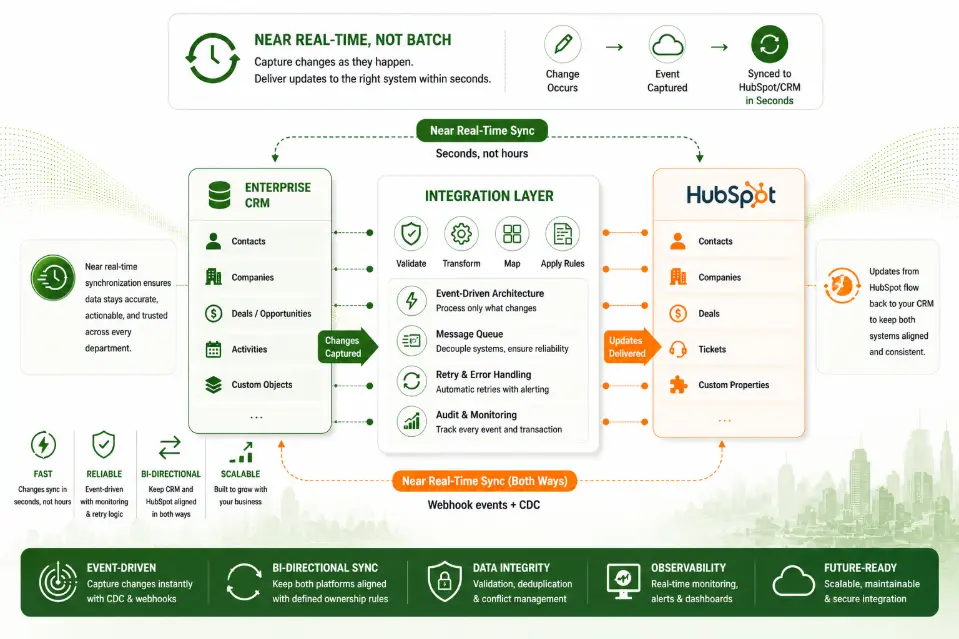
In our projects, we typically follow an event-driven synchronization flow:
- A business event is detected through Change Data Capture.
- The event enters an integration layer where data is validated, transformed, and mapped to the corresponding HubSpot properties.
- Business rules are applied before HubSpot APIs create or update the appropriate records.
Instead of tightly coupling the CRM directly to HubSpot, this architecture introduces a dedicated integration layer that separates business logic from individual applications. As a result, future changes become much easier to manage because transformation rules exist in one centralized location rather than being duplicated across multiple systems.
Synchronizing HubSpot Back to the CRM
Enterprise synchronization is rarely one-way. Marketing teams often work directly inside HubSpot:
- They update Contact information.
- Modify Lifecycle Stages.
- Enrich customer profiles.
- Segment audiences.
- Create marketing-specific properties.
If these changes remain inside HubSpot, operational systems gradually become outdated. This is why bidirectional synchronization is essential.
Rather than treating HubSpot as a reporting platform, we consider it an active participant within the enterprise ecosystem. Whenever predefined properties change inside HubSpot, those updates can trigger automation that sends the new information back to the internal CRM. HubSpot Workflows combined with Webhooks provide an effective mechanism for detecting these changes. The integration layer receives the webhook, validates the incoming data, applies business rules, and updates the corresponding records inside the organization's operational systems.
This allows both platforms to remain synchronized while preserving clearly defined ownership rules established during the architecture phase.
Why an Integration Layer Matters
One question we often hear is: "Why not let the CRM communicate directly with HubSpot?"
Technically, this is certainly possible. However, direct system-to-system integrations become increasingly difficult to maintain as organizations introduce additional business systems.
Imagine adding an ERP, a customer portal, a marketing analytics platform, an external data provider, etc. If every application communicates directly with every other application, the number of integration points grows rapidly. This creates tightly coupled systems that become harder to modify over time.
Instead, we recommend introducing an integration layer that becomes responsible for:
- Data transformation
- Validation
- Property mapping
- Error handling
- Logging
- Retry mechanisms
- Business rule execution
Each business application communicates with the integration layer rather than directly with every other platform. This significantly improves maintainability while making future integrations much easier.
Preventing Synchronization Loops and Data Conflicts
Bidirectional synchronization introduces another important challenge.
What happens if both systems update the same Contact?
Without appropriate safeguards, synchronization can create endless update loops:
- CRM updates HubSpot.
- HubSpot detects the change and updates the CRM.
- The CRM interprets that update as a new modification and sends it back again.
- The cycle continues indefinitely.
Preventing this requires more than technical implementation. It requires governance. During every enterprise implementation, we establish rules that clearly define:
- Which system owns each property.
- Which updates should trigger synchronization.
- Which changes should be ignored.
- How conflicting updates should be resolved.
- How synchronization history should be tracked.
These governance decisions are just as important as the integration technology itself.
Designing for Reliability
Every enterprise integration experiences temporary failures. A network connection may become unavailable. An API rate limit may be reached. A downstream system may be undergoing maintenance.
Reliable synchronization assumes these situations will occur. Rather than allowing failures to interrupt business operations, enterprise integration should include mechanisms for:
- Automatic retries
- Error logging
- Monitoring dashboards
- Alert notifications
- Recovery procedures
- Message replay where appropriate
Designing for failure may seem pessimistic, but it is one of the characteristics that separates enterprise software from simple integrations. Reliable systems are not those that never fail. They are the systems that recover gracefully when failures inevitably occur.
Lessons from the Field
Across different HubSpot implementation projects, one lesson consistently stands out.
Organizations often focus on moving data faster. The more valuable objective is moving the right data at the right time.
Near real-time synchronization isn't about achieving the lowest possible latency. It's about ensuring that every business process receives accurate information when it needs it.
- Marketing automation becomes more effective.
- Sales decisions become more reliable.
- Customer service gains greater visibility.
- Executives trust reporting because every department works from the same information.
Technology enables synchronization. Business value comes from consistency.
Common Mistakes We See
Building a two-way synchronization system may seem straightforward, but several mistakes can create data inconsistencies or make the integration difficult to maintain.
1. Treating synchronization as simple field-to-field copying
A common mistake is assuming that every field in the CRM should simply be copied to its equivalent HubSpot property. In reality, the two systems often have different data models, business rules, and ownership requirements.
A proper synchronization strategy needs to define:
- Which fields should be synchronized.
- Which system is the source of truth for each field.
- How values should be transformed.
- Which fields should be read-only in each system.
- How changes should be handled when both systems are updated.
Without these rules, synchronization can easily result in incorrect data or unexpected overwrites.
2. Allowing synchronization loops
Two-way synchronization can accidentally create an endless loop. For example:
CRM updated
↓
HubSpot updated
↓
HubSpot triggers webhook
↓
CRM updated
↓
CRM triggers synchronization
↓
HubSpot updated again
Without proper safeguards, the same record can continue moving between systems unnecessarily. We therefore design synchronization workflows with mechanisms to identify the origin of an update and prevent changes from being repeatedly propagated between systems.
3. Ignoring failed synchronization events
Another common mistake is assuming that an API request will always succeed. In production environments, synchronization can fail because of:
- Invalid data
- API errors
- Authentication issues
- Rate limits
- Network failures
- Missing records
- Unexpected property values
A reliable integration needs to record failed events and provide a way to retry or reconcile them instead of silently losing the update.
4. Relying entirely on real-time events
Near real-time synchronization is valuable, but it should not mean that the architecture has no mechanism for recovering missed events. Events can occasionally fail to reach the integration layer or be processed successfully.
For this reason, we recommend combining event-driven synchronization with reconciliation mechanisms that periodically check for inconsistencies and recover records that may have been missed.
5. Synchronizing everything
More synchronization does not necessarily mean better synchronization. Sending every field and every change between systems can increase complexity, API usage, and the risk of conflicts.
A better approach is to identify the data that actually needs to move between systems and define clear synchronization rules around those business requirements.
Looking for an Enterprise HubSpot Partner?
At BHSoft, we design and build enterprise HubSpot integration solutions that go far beyond API connectivity.
From event-driven synchronization and CRM integration to workflow automation and scalable integration architecture, our team helps organizations create connected ecosystems where data moves reliably across every business system.
👉 If you're planning a HubSpot implementation or modernizing an existing enterprise integration, Contact BHSOFT today to discuss your project!