Legacy Application Modernization: An In-Depth Guideline For SMEs
5 minutes read
Updated on May 23, 2026
In today’s fast-paced digital ecosystem, small and medium-sized enterprises (SMEs) face a major challenge: balancing innovation with the limitations of outdated technology. Studies show that maintaining legacy IT systems can consume a significant share of an organization’s IT budget, leaving fewer resources for innovation and growth.
If your core business software feels slow, struggles to integrate with modern tools, or creates increasing security and maintenance risks, it may be time for modernization. This guideline provides a practical roadmap for legacy application modernization tailored for SMEs, helping businesses improve agility, reduce operational costs, and stay competitive.
What Is Legacy Application Modernization?
Legacy application modernization is the process of updating or transforming outdated software systems to meet current business needs, technological advancements, and security standards.
Modernization can take various forms, including migrating applications to the cloud, refactoring existing code, rearchitecting for better scalability, or replacing outdated software with modern solutions. The goal is to improve efficiency, security, and user experience while ensuring the system aligns with modern business processes.
Read more: Best Practices for DevOps in Legacy System Migration
Why Is Legacy Application Modernization Critical For SMEs?
Legacy systems might seem reliable, but they come with severe risks that can cripple business growth:
Security Vulnerabilities
Outdated software is a hacker’s playground. Older systems lack modern security patches, exposing your business to data breaches and compliance issues. This exposes your business to potential data breaches and financial fraud. A single data breach can cause severe reputational damage and financial losses for your business.
High Maintenance Costs
The older your system, the more expensive it is to maintain. Research shows that businesses spend up to 80% of IT budgets just keeping outdated systems. Ongoing updates, security patches, and technical support demand significant resources and specialized expertise, increasing operational expenses. This diverts valuable financial and workforce investments away from innovation, scalability, and efficiency improvements that drive business growth.
Poor Customer Experience
Slow, inefficient software leads to frustrated employees and dissatisfied customers. Outdated systems struggle to handle modern user expectations, leading to slower response times, errors, and a lack of seamless digital experiences. As customer experience becomes a key differentiator in competitive markets, failing to modernize your applications can result in lost customers and declining brand loyalty.
Limited Integration Capabilities
Legacy applications often fail to integrate with modern tools, restricting your ability to leverage new technologies like AI, machine learning, and cloud computing. Many SMEs rely on third-party applications for analytics, customer relationship management (CRM), and automation, but outdated systems create barriers, preventing businesses from fully capitalizing on digital transformation opportunities.
Read more: CI/CD vs DevOps: Understanding the Key Differences
Top Signs Your SME Needs to Modernize Existing Software
For SMEs, budget constraints often lead to a "if it isn't broken, don't fix it" mindset. However, delaying upgrades creates massive technical debt. Here are the clear warning signs that your software is holding your business back:
1. High Maintenance Costs & Technical Debt
Are you spending more money keeping the lights on than developing new features? Finding developers who understand outdated coding languages (like COBOL, Delphi, or older versions of Java/PHP) is becoming increasingly difficult and expensive.
2. Security Vulnerabilities & Compliance Risks
Legacy software often runs on unsupported operating systems or outdated frameworks that no longer receive security patches. This leaves your SME highly vulnerable to data breaches, ransomware, and non-compliance penalties (such as GDPR or HIPAA violations).
3. Inability to Integrate with Modern Cloud Platforms or APIs
Modern business relies on interconnected ecosystems. If your system cannot seamlessly connect with third-party SaaS tools, modern CRM platforms, or advanced payment gateways due to rigid, monolithic architecture, you are missing out on automation and scalability.
4. Decreasing employee and customer satisfaction
Outdated interfaces and inefficient workflows frustrate users, leading to decreased productivity and higher employee turnover.
The 7 Rs of Legacy Application Modernization Strategies
Choosing how to upgrade depends heavily on your budget, time, and system complexity. Gartner defines the "7 Rs" framework, summarized below to help SMEs weigh the pros and cons of each approach:
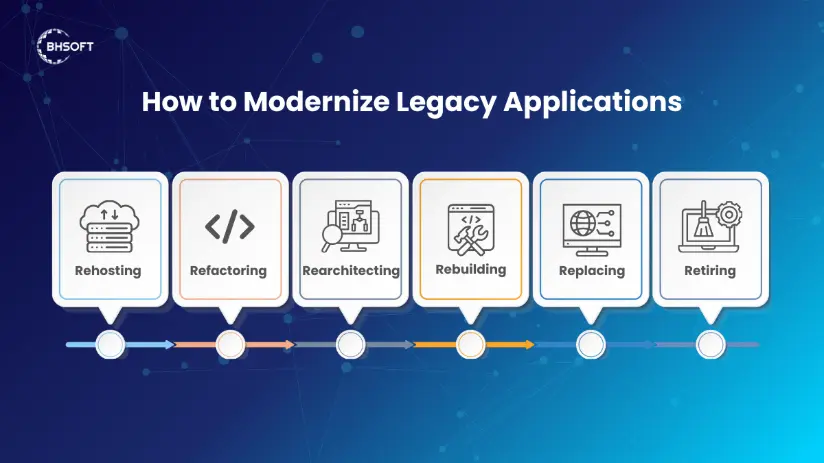
Rehosting (Lift-and-Shift Approach)
One of the most common approaches is rehosting, also known as lift-and-shift. This involves moving an existing application to a cloud environment with minimal modifications. While this is the fastest way to migrate to the cloud, it does not fully leverage cloud-native features. However, it improves performance, reduces infrastructure costs, and enables businesses to scale as needed.
Refactoring for Enhanced Performance
Another popular strategy is refactoring, which involves optimizing and restructuring parts of the application’s codebase without altering its core functionality. This is ideal for businesses that want to improve application performance and scalability while keeping key features intact. By refactoring, organizations can achieve better efficiency and ensure seamless integration with modern tools.
Rearchitecting for Long-Term Scalability
For companies seeking long-term scalability and flexibility, rearchitecting is an effective option. This method involves redesigning the application’s architecture to support modern cloud-based technologies such as microservices and DevOps practices. Although this requires a larger investment, it significantly enhances agility, security, and overall performance.
Rebuilding for a Future-Proof System
Rebuilding is a more extensive process where an application is redeveloped from scratch using modern technologies. This approach is best suited for businesses that require a complete transformation to align with evolving business models and customer expectations. Though costly and time-consuming, it results in a highly scalable and future-proof system that supports long-term growth.
Replacing with a Modern Solution
In some cases, businesses may choose to replace their legacy system entirely with a new, off-the-shelf, or custom-built solution. This method is particularly useful when the existing system is outdated, difficult to maintain, or no longer serves its intended purpose. While replacing a system requires data migration and adaptation, it allows businesses to implement the latest technology without the constraints of legacy software.
Replatforming for Minimal Disruption
For companies that need minimal change, replatforming is another viable option. This involves moving an application to a new cloud platform with slight modifications to enhance performance. It provides better infrastructure efficiency without requiring a complete overhaul of the system, making it a cost-effective modernization strategy.
Retiring Outdated Systems
Lastly, organizations may choose to retire outdated applications that are no longer needed. This approach involves decommissioning legacy systems and consolidating functionalities into newer applications that offer greater efficiency. Retiring legacy applications helps reduce maintenance costs, security risks, and system redundancies.
Each modernization approach comes with its own advantages and challenges, and selecting the right one depends on factors such as business goals, budget, compliance requirements, and technological compatibility. Conducting a thorough assessment of your legacy system will help determine the most effective strategy to future-proof your business.
Read more: Modernize Monolithic Applications: A Strategic Blueprint For CIOs
Step-by-Step Modernization Roadmap Tailored for SMEs
A successful modernization project does not happen overnight. For SMEs, a phased approach is essential to minimize operational disruption and reduce migration risks.
Step 1: Assess Existing Systems and Architecture
Before implementing modernization initiatives, evaluate your current infrastructure, application dependencies, and code quality. Identify performance bottlenecks, security gaps, and integration limitations. At this stage, determining whether to modernize incrementally or fully replace the system is critical.
Step 2: Define Business Goals and ROI
Establish clear modernization objectives. These may include improving application performance, reducing infrastructure costs, enhancing scalability, or accelerating development cycles. Defining measurable KPIs helps ensure modernization efforts deliver real business value.
Step 3: Choose the Right Modernization Strategy
Select the most suitable modernization approach based on your system audit and business priorities. For SMEs, a phased migration strategy — such as the “Strangler Fig” pattern — is often the safest option, allowing legacy components to be gradually replaced with modern services over time instead of relying on a high-risk full migration.
Step 4: Implement Continuous Testing and DevOps Practices
Adopt Automated Testing and CI/CD pipelines to maintain software stability throughout the modernization process. Continuous testing helps reduce deployment risks, protect data integrity, and minimize downtime during updates and migrations.
Main Challenges SMEs Face During Modernization
Challenge 1: Limited Budget.
Unlike large enterprises, SMEs cannot afford massive upfront R&D investments.
Solution: Focus on high-impact, low-effort modules first. Modernize your system iteratively so that early wins can fund later phases.
Challenge 2: Resistance to Change.
Employees are often comfortable with old workflows, no matter how clunky they are.
Solution: Provide comprehensive training sessions during the transition and involve end-users in the UI/UX design phase.
Challenge 3: Skills Gap.
Your in-house IT team might excel at maintaining the current system but lack expertise in cloud-native technologies, Kubernetes, or modern DevOps practices.
Solution: Partner with an experienced offshore development team or leverage artificial intelligence tools. To see how AI can streamline this friction point, check out our guide on AI-Powered Modernization for Legacy Systems.
Conclusion
Now that you know how to modernize legacy applications effectively, it's time to take the next step. While modernizing outdated systems is a crucial investment, it requires careful planning, expertise, and execution to ensure success. Choosing the right IT partner can make all the difference in streamlining the process and maximizing the benefits.
At BHSOFT, we specialize in legacy application modernization and transformation, helping businesses seamlessly upgrade outdated systems using the latest technologies and best practices. Our team of experienced engineers ensures that your modernization journey is smooth, secure, and aligned with your business goals.
Don't let outdated systems hold your business back. Contact us today to schedule a consultation and start your transformation!